Compare commits
| Author | SHA1 | Date | |
|---|---|---|---|
 Rejdukien |
822a622d97 | ||
|
Rejdukien
|
1e7aba5297 |
No files matched your search
@@ -1,11 +0,0 @@
|
||||
server {
|
||||
listen 80;
|
||||
|
||||
location / {
|
||||
root /usr/share/nginx/html;
|
||||
index index.html index.htm;
|
||||
try_files $uri $uri/ /index.html =404;
|
||||
}
|
||||
|
||||
include /etc/nginx/extra-conf.d/*.conf;
|
||||
}
|
||||
@@ -1 +0,0 @@
|
||||
/node_modules/
|
||||
@@ -1,21 +0,0 @@
|
||||
# http://editorconfig.org
|
||||
|
||||
root = true
|
||||
|
||||
[*]
|
||||
charset = utf-8
|
||||
end_of_line = lf
|
||||
|
||||
[*.{js,ts,vue}]
|
||||
indent_size = 4
|
||||
indent_style = space
|
||||
insert_final_newline = true
|
||||
trim_trailing_whitespace = true
|
||||
|
||||
[*.json]
|
||||
indent_size = 4
|
||||
indent_style = space
|
||||
|
||||
[*.yml]
|
||||
indent_size = 2
|
||||
indent_style = space
|
||||
@@ -5,11 +5,4 @@ VUE_APP_HOSTNAME=printer.local
|
||||
VUE_APP_PORT=7125
|
||||
|
||||
# reconnect interval in ms
|
||||
VUE_APP_RECONNECT_INTERVAL=5000
|
||||
|
||||
# where should mainsail read the instances from (moonraker, browser or json)
|
||||
VUE_APP_INSTANCES_DB="moonraker"
|
||||
|
||||
# defaults for multi language tests
|
||||
VUE_APP_I18N_LOCALE=en
|
||||
VUE_APP_I18N_FALLBACK_LOCALE=en
|
||||
VUE_APP_RECONNECT_INTERVAL=5000
|
||||
@@ -1,40 +0,0 @@
|
||||
{
|
||||
"root": true,
|
||||
"env": {
|
||||
"browser": true,
|
||||
"es6": true,
|
||||
"node": true
|
||||
},
|
||||
"extends": ["plugin:jsonc/base", "plugin:vue/recommended", "eslint:recommended", "@vue/typescript", "prettier"],
|
||||
"globals": {
|
||||
"Atomics": "readonly",
|
||||
"SharedArrayBuffer": "readonly"
|
||||
},
|
||||
"rules": {
|
||||
"vue/no-v-html": 0,
|
||||
"vue/component-tags-order": 0,
|
||||
"vue/no-v-text-v-html-on-component": 0,
|
||||
"vue/valid-v-slot": [
|
||||
"error",
|
||||
{
|
||||
"allowModifiers": true
|
||||
}
|
||||
]
|
||||
},
|
||||
"parser": "vue-eslint-parser",
|
||||
"parserOptions": {
|
||||
"parser": "@typescript-eslint/parser",
|
||||
"sourceType": "module"
|
||||
},
|
||||
"plugins": ["vue"],
|
||||
"overrides": [
|
||||
{
|
||||
"files": "src/locales/*.json",
|
||||
"parser": "jsonc-eslint-parser",
|
||||
"rules": {
|
||||
"jsonc/no-dupe-keys": "error",
|
||||
"jsonc/sort-keys": ["error", "asc", { "caseSensitive": false, "natural": false }]
|
||||
}
|
||||
}
|
||||
]
|
||||
}
|
||||
@@ -1,13 +0,0 @@
|
||||
# Contributor Code of Conduct
|
||||
|
||||
As contributors and maintainers of this project, we pledge to respect all people who contribute through reporting issues, posting feature requests, updating documentation, submitting pull requests or patches, and other activities.
|
||||
|
||||
We are committed to making participation in this project a harassment-free experience for everyone, regardless of the level of experience, gender, gender identity and expression, sexual orientation, disability, personal appearance, body size, race, age, or religion.
|
||||
|
||||
Examples of unacceptable behavior by participants include the use of sexual language or imagery, derogatory comments or personal attacks, trolling, public or private harassment, insults, or other unprofessional conduct.
|
||||
|
||||
Project maintainers have the right and responsibility to remove, edit, or reject comments, commits, code, wiki edits, issues, and other contributions that are not aligned to this Code of Conduct. Project maintainers who do not follow the Code of Conduct may be removed from the project team.
|
||||
|
||||
Instances of abusive, harassing, or otherwise unacceptable behavior may be reported by opening an issue or contacting one or more of the project maintainers.
|
||||
|
||||
This Code of Conduct is adapted from the [Contributor Covenant](http://contributor-covenant.org), version 1.0.0, available at [http://contributor-covenant.org/version/1/0/0/](http://contributor-covenant.org/version/1/0/0/)
|
||||
@@ -1,36 +0,0 @@
|
||||
Developer Certificate of Origin
|
||||
Version 1.1
|
||||
|
||||
Copyright (C) 2004, 2006 The Linux Foundation and its contributors.
|
||||
1 Letterman Drive
|
||||
Suite D4700
|
||||
San Francisco, CA, 94129
|
||||
|
||||
Everyone is permitted to copy and distribute verbatim copies of this
|
||||
license document, but changing it is not allowed.
|
||||
|
||||
Developer's Certificate of Origin 1.1
|
||||
|
||||
By making a contribution to this project, I certify that:
|
||||
|
||||
(a) The contribution was created in whole or in part by me and I
|
||||
have the right to submit it under the open source license
|
||||
indicated in the file; or
|
||||
|
||||
(b) The contribution is based upon previous work that, to the best
|
||||
of my knowledge, is covered under an appropriate open source
|
||||
license and I have the right under that license to submit that
|
||||
work with modifications, whether created in whole or in part
|
||||
by me, under the same open source license (unless I am
|
||||
permitted to submit under a different license), as indicated
|
||||
in the file; or
|
||||
|
||||
(c) The contribution was provided directly to me by some other
|
||||
person who certified (a), (b) or (c) and I have not modified
|
||||
it.
|
||||
|
||||
(d) I understand and agree that this project and the contribution
|
||||
are public and that a record of the contribution (including all
|
||||
personal information I submit with it, including my sign-off) is
|
||||
maintained indefinitely and may be redistributed consistent with
|
||||
this project or the open source license(s) involved.
|
||||
@@ -0,0 +1,22 @@
|
||||
---
|
||||
name: Bug report
|
||||
about: Create a report to help us improve
|
||||
title: ''
|
||||
labels: bug
|
||||
assignees: ''
|
||||
|
||||
---
|
||||
|
||||
**Describe the bug:**\
|
||||
A clear and concise description of what the bug is.
|
||||
|
||||
**Expected behavior:**\
|
||||
A clear and concise description of what you expected to happen.
|
||||
|
||||
**Screenshots:**\
|
||||
If applicable, add screenshots to help explain your problem.
|
||||
|
||||
**Logfiles:**\
|
||||
Please upload your Logfiles here or upload them to [pastebin.com](http://pastebin.com) and paste your log links here.
|
||||
- klippy.log
|
||||
- moonraker.log
|
||||
@@ -1,94 +0,0 @@
|
||||
name: Bug report
|
||||
description: You found an issue while using Mainsail? Report it here!
|
||||
labels: ['⚡ Type: Bug']
|
||||
body:
|
||||
- type: markdown
|
||||
attributes:
|
||||
value: >-
|
||||
## ✨ First of all: Thank you for choosing Mainsail! ✨
|
||||
|
||||
#### This form is ONLY for reporting issues and bugs related to Mainsail!
|
||||
|
||||
* In case you want to make a feature request, please use the following
|
||||
form: [Feature
|
||||
request](https://github.com/mainsail-crew/mainsail/issues/new?assignees=&labels=feature+request&template=feature_request.yml)
|
||||
|
||||
* If you need general support, please visit us on
|
||||
[Discord](https://discord.gg/mainsail)
|
||||
|
||||
---
|
||||
- type: input
|
||||
id: version
|
||||
attributes:
|
||||
label: 'Mainsail Version:'
|
||||
description: Mainsail version where the issue occurs
|
||||
placeholder: <your current mainsail version>
|
||||
validations:
|
||||
required: true
|
||||
- type: dropdown
|
||||
id: browser
|
||||
attributes:
|
||||
label: 'Browser:'
|
||||
description: Which browser did you use when the issue occured?
|
||||
options:
|
||||
- Chrome
|
||||
- Firefox
|
||||
- Safari
|
||||
- Edge
|
||||
- Other (Please tell us below)
|
||||
validations:
|
||||
required: true
|
||||
- type: dropdown
|
||||
id: device
|
||||
attributes:
|
||||
label: 'Device:'
|
||||
description: What kind of device did you use when the issue occured?
|
||||
options:
|
||||
- Desktop PC
|
||||
- Laptop
|
||||
- Mobile device (Phone, Tablet or similar)
|
||||
- Other (Please tell us below)
|
||||
validations:
|
||||
required: true
|
||||
- type: dropdown
|
||||
id: os
|
||||
attributes:
|
||||
label: 'Operating System:'
|
||||
description: Which operating system runs on the device?
|
||||
options:
|
||||
- Windows
|
||||
- macOS
|
||||
- Linux
|
||||
- Android
|
||||
- iOS
|
||||
- Other (Please tell us below)
|
||||
validations:
|
||||
required: true
|
||||
- type: textarea
|
||||
id: what-happened
|
||||
attributes:
|
||||
label: 'What happened?'
|
||||
description: A clear and concise description of what the bug is.
|
||||
validations:
|
||||
required: true
|
||||
- type: textarea
|
||||
id: expected-behavior
|
||||
attributes:
|
||||
label: 'What did you expect to happen instead?'
|
||||
description: A clear and concise description of what you expected to happen instead.
|
||||
validations:
|
||||
required: true
|
||||
- type: textarea
|
||||
id: repro-steps
|
||||
attributes:
|
||||
label: 'How to reproduce this bug?'
|
||||
description: A clear description with precise steps to reproduce this bug.
|
||||
validations:
|
||||
required: true
|
||||
- type: textarea
|
||||
id: additional-info
|
||||
attributes:
|
||||
label: 'Additional information:'
|
||||
description: |
|
||||
If you have any additional information for us or the options to choose from didn't suit your case, use the field below.
|
||||
Please note, you can also attach screenshots or screen recordings which help to display/describe the issue.
|
||||
@@ -1,5 +0,0 @@
|
||||
blank_issues_enabled: false
|
||||
contact_links:
|
||||
- name: Mainsail Discord Server
|
||||
url: https://discord.gg/mainsail
|
||||
about: If you have questions or need general support, please visit us here.
|
||||
@@ -0,0 +1,20 @@
|
||||
---
|
||||
name: Feature request
|
||||
about: Suggest an idea for this project
|
||||
title: "[FR]"
|
||||
labels: ''
|
||||
assignees: ''
|
||||
|
||||
---
|
||||
|
||||
**Is your feature request related to a problem? Please describe.**
|
||||
A clear and concise description of what the problem is. Ex. I'm always frustrated when [...]
|
||||
|
||||
**Describe the solution you'd like**
|
||||
A clear and concise description of what you want to happen.
|
||||
|
||||
**Describe alternatives you've considered**
|
||||
A clear and concise description of any alternative solutions or features you've considered.
|
||||
|
||||
**Additional context**
|
||||
Add any other context or screenshots about the feature request here.
|
||||
@@ -1,41 +0,0 @@
|
||||
name: Feature request
|
||||
description: You have an idea for a new feature? Tell us here!
|
||||
labels: ['💡 Type: FR']
|
||||
body:
|
||||
- type: markdown
|
||||
attributes:
|
||||
value: >-
|
||||
## ✨ First of all: Thank you for choosing Mainsail! ✨
|
||||
|
||||
#### This form is ONLY for feature requests related to Mainsail!
|
||||
|
||||
* In case you want to report an issue, please use the following
|
||||
form: [Bug report](https://github.com/mainsail-crew/mainsail/issues/new?assignees=&labels=feature+request&template=bug_report.yml)
|
||||
|
||||
* If you need general support, please visit us on
|
||||
[Discord](https://discord.gg/mainsail)
|
||||
|
||||
---
|
||||
- type: textarea
|
||||
id: request
|
||||
attributes:
|
||||
label: 'Requested feature:'
|
||||
description: >-
|
||||
A clear and concise description of the feature you wish to see implemented.
|
||||
validations:
|
||||
required: true
|
||||
- type: textarea
|
||||
id: problem
|
||||
attributes:
|
||||
label: 'Solves the following problem:'
|
||||
description: |
|
||||
Is your feature request related to a problem? Please describe below.
|
||||
(In case there is an existing bug report, please add the link to it)
|
||||
validations:
|
||||
required: false
|
||||
- type: textarea
|
||||
id: additional-info
|
||||
attributes:
|
||||
label: 'Additional information:'
|
||||
description: |
|
||||
If you have any additional information use the field below.
|
||||
@@ -1,51 +0,0 @@
|
||||
<!--
|
||||
For Work In Progress Pull Requests, please use the Draft PR feature,
|
||||
see https://github.blog/2019-02-14-introducing-draft-pull-requests/ for further details.
|
||||
|
||||
For a timely review/response, please avoid force-pushing additional
|
||||
commits if your PR already received reviews or comments.
|
||||
|
||||
We use squash-merge to merge PRs, so the commit history is clean, but we use the PR title as the commit message.
|
||||
So we recommend you to use the PR title with conventional commits type prefixes. We use the following prefixes for the PR title:
|
||||
- feat: A new feature
|
||||
- fix: A bug fix
|
||||
- docs: Documentation only changes
|
||||
- style: Changes that do not affect the meaning of the code (white-space, formatting, etc)
|
||||
- refactor: A code change that neither fixes a bug nor adds a feature
|
||||
- perf: A code change that improves performance
|
||||
- test: Adding missing tests or correcting existing tests
|
||||
- chore: Changes to the build process or auxiliary tools and libraries such as documentation generation
|
||||
- locale: Changes to the translations
|
||||
|
||||
You can found more information about Conventional Commits here: https://www.conventionalcommits.org/en/v1.0.0/.
|
||||
|
||||
Before submitting a Pull Request, please ensure you've done the following:
|
||||
- 📖 Read the Mainsail Contributing Guidelines: https://github.com/mainsail-crew/mainsail/blob/HEAD/CONTRIBUTING.md#-submitting-a-pull-request-pr.
|
||||
- 📖 Read the Mainsail Code of Conduct: https://github.com/mainsail-crew/mainsail/blob/HEAD/.github/CODE_OF_CONDUCT.md.
|
||||
- 👷♀️ Create small PRs. In most cases, this will be possible.
|
||||
- ✅ Provide tests for your changes.
|
||||
- 📝 Use descriptive commit messages.
|
||||
- 📗 Update any related documentation and include any relevant screenshots.
|
||||
-->
|
||||
|
||||
## Description
|
||||
|
||||
<!--
|
||||
Please do not leave this blank
|
||||
This PR [adds/removes/fixes/replaces] the [feature/bug/etc].
|
||||
-->
|
||||
|
||||
## Related Tickets & Documents
|
||||
|
||||
<!--
|
||||
Please use this format link issue numbers: Fixes #123
|
||||
https://docs.github.com/en/free-pro-team@latest/github/managing-your-work-on-github/linking-a-pull-request-to-an-issue#linking-a-pull-request-to-an-issue-using-a-keyword
|
||||
-->
|
||||
|
||||
## Mobile & Desktop Screenshots/Recordings
|
||||
|
||||
<!-- Visual changes require screenshots -->
|
||||
|
||||
## [optional] Are there any post-deployment tasks we need to perform?
|
||||
|
||||
<!-- note: PRs with deleted sections will be marked invalid -->
|
||||
@@ -1,21 +0,0 @@
|
||||
# Set update schedule for GitHub Actions
|
||||
|
||||
version: 2
|
||||
updates:
|
||||
- package-ecosystem: 'github-actions'
|
||||
directory: '/'
|
||||
schedule:
|
||||
# Check for updates to GitHub Actions every week
|
||||
interval: 'weekly'
|
||||
|
||||
- package-ecosystem: 'npm'
|
||||
directory: '/'
|
||||
schedule:
|
||||
interval: 'weekly'
|
||||
allow:
|
||||
# Ignore major updates to all dependencies. We're using old versions of some packages that are incompatible with newer versions of other packages.
|
||||
- dependency-name: '*'
|
||||
update-type: 'semver:non-major'
|
||||
dependency-type: 'direct'
|
||||
assignees:
|
||||
- 'meteyou'
|
||||
@@ -1,23 +0,0 @@
|
||||
# Configuration for Label Actions - https://github.com/dessant/label-actions
|
||||
|
||||
not on Github:
|
||||
issues:
|
||||
comment: |
|
||||
Ahoi!
|
||||
|
||||
It looks like this ticket is a request for help (or similar).
|
||||
Many helpful people will not see your message here and you are
|
||||
unlikely to get a useful response.
|
||||
|
||||
We use github to handle bugreports, feature requests and
|
||||
planning new releases.
|
||||
|
||||
Please use our Discord-Server for help: [discord.gg/mainsail](https://discord.gg/mainsail)
|
||||
|
||||
This ticket will be automatically closed.
|
||||
|
||||
Fair wind and a following sea!
|
||||
~ Your friendly MainsailGithubBot
|
||||
|
||||
*PS: I'm just an automated script, not a real sailor.*
|
||||
close: true
|
||||
@@ -1,38 +0,0 @@
|
||||
name: 'Auto analyze if package.json was edited'
|
||||
|
||||
on:
|
||||
pull_request:
|
||||
branches:
|
||||
- develop
|
||||
|
||||
permissions:
|
||||
pull-requests: write
|
||||
|
||||
jobs:
|
||||
auto-analyze:
|
||||
runs-on: ubuntu-latest
|
||||
steps:
|
||||
- uses: actions/checkout@v4
|
||||
with:
|
||||
fetch-depth: 0
|
||||
ref: ${{ github.event.pull_request.head.sha }}
|
||||
|
||||
- name: Check package.json was changed
|
||||
id: changed-file-package-json
|
||||
uses: tj-actions/changed-files@v23
|
||||
with:
|
||||
sha: ${{ github.event.pull_request.head.sha }}
|
||||
|
||||
- name: Install node
|
||||
uses: actions/setup-node@v3
|
||||
if: contains(steps.changed-file-package-json.outputs.modified_files, 'package.json')
|
||||
with:
|
||||
node-version: 20
|
||||
cache: 'npm'
|
||||
|
||||
- uses: preactjs/compressed-size-action@v2
|
||||
if: contains(steps.changed-file-package-json.outputs.modified_files, 'package.json')
|
||||
with:
|
||||
strip-hash: "\\b\\w{8}\\."
|
||||
pattern: './dist/**/*.{js,css,html,json,woff2,svg,png}'
|
||||
exclude: '{./dist/manifest.json,./dist/build.zip,**/*.map,**/node_modules/**}'
|
||||
@@ -1,45 +0,0 @@
|
||||
# This is a basic workflow to help you get started with Actions
|
||||
|
||||
name: Build
|
||||
|
||||
# Controls when the workflow will run
|
||||
on:
|
||||
# Triggers the workflow on push or pull request events but only for the develop branch
|
||||
push:
|
||||
branches: [develop]
|
||||
pull_request:
|
||||
branches: [develop]
|
||||
|
||||
# Allows you to run this workflow manually from the Actions tab
|
||||
workflow_dispatch:
|
||||
|
||||
# A workflow run is made up of one or more jobs that can run sequentially or in parallel
|
||||
jobs:
|
||||
# This workflow contains a single job called "build"
|
||||
build:
|
||||
# The type of runner that the job will run on
|
||||
runs-on: ubuntu-latest
|
||||
|
||||
# Steps represent a sequence of tasks that will be executed as part of the job
|
||||
steps:
|
||||
- name: Fetch repo
|
||||
uses: actions/checkout@v4
|
||||
|
||||
- name: Install node
|
||||
uses: actions/setup-node@v3
|
||||
with:
|
||||
node-version: 20
|
||||
|
||||
- name: Install dependencies
|
||||
run: npm ci
|
||||
|
||||
- name: Build
|
||||
run: npm run build
|
||||
|
||||
- name: Copy output
|
||||
run: cp ${{ github.workspace }}/dist/mainsail.zip mainsail-latest.zip
|
||||
|
||||
- uses: actions/upload-artifact@v3
|
||||
with:
|
||||
name: mainsail-latest.zip
|
||||
path: mainsail-latest.zip
|
||||
@@ -1,18 +0,0 @@
|
||||
name: Build Size Report
|
||||
on:
|
||||
pull_request_target:
|
||||
types: [labeled, synchronize, reopened]
|
||||
jobs:
|
||||
check:
|
||||
runs-on: ubuntu-latest
|
||||
if: contains(github.event.pull_request.labels.*.name, 'analyze')
|
||||
timeout-minutes: 30
|
||||
steps:
|
||||
- uses: actions/checkout@v4
|
||||
with:
|
||||
ref: ${{ github.event.pull_request.head.sha }}
|
||||
- uses: preactjs/compressed-size-action@v2
|
||||
with:
|
||||
strip-hash: "\\b\\w{8}\\."
|
||||
pattern: './dist/**/*.{js,css,html,json,woff2,svg,png}'
|
||||
exclude: '{./dist/manifest.json,./dist/build.zip,**/*.map,**/node_modules/**}'
|
||||
@@ -1,19 +0,0 @@
|
||||
name: Check PR title
|
||||
|
||||
on:
|
||||
pull_request_target:
|
||||
types:
|
||||
- opened
|
||||
- reopened
|
||||
- edited
|
||||
- synchronize
|
||||
|
||||
jobs:
|
||||
lint:
|
||||
runs-on: ubuntu-latest
|
||||
permissions:
|
||||
statuses: write
|
||||
steps:
|
||||
- uses: aslafy-z/conventional-pr-title-action@v3
|
||||
env:
|
||||
GITHUB_TOKEN: ${{ secrets.GITHUB_TOKEN }}
|
||||
@@ -1,57 +0,0 @@
|
||||
name: Check Translations
|
||||
on:
|
||||
pull_request_target:
|
||||
types: [synchronize, opened]
|
||||
paths:
|
||||
- 'src/locales/**'
|
||||
|
||||
jobs:
|
||||
check_translations:
|
||||
runs-on: ubuntu-latest
|
||||
steps:
|
||||
- name: Install jq
|
||||
run: sudo apt install -y jq
|
||||
|
||||
- name: Fetch repo
|
||||
uses: actions/checkout@v4
|
||||
with:
|
||||
fetch-depth: 0
|
||||
ref: ${{ github.event.pull_request.head.sha }}
|
||||
|
||||
- name: Install node
|
||||
uses: actions/setup-node@v3
|
||||
with:
|
||||
node-version: 20
|
||||
|
||||
- name: Install dependencies
|
||||
run: npm ci
|
||||
|
||||
- name: Get changed files
|
||||
id: changed-files
|
||||
uses: tj-actions/changed-files@v23
|
||||
with:
|
||||
sha: ${{ github.event.pull_request.head.sha }}
|
||||
files: 'src/locales/*.json'
|
||||
|
||||
- name: Run i18n-extract on changed locale files
|
||||
id: i18n-extract
|
||||
env:
|
||||
OUTPUT: ''
|
||||
run: |
|
||||
mkdir ./i18n-extract
|
||||
for file in ${{ steps.changed-files.outputs.all_changed_files }}; do
|
||||
npm run i18n-extract -- --languageFiles=src/locales/${file##*/} --output=i18n-extract/${file##*/}
|
||||
MISSING=$(cat i18n-extract/${file##*/} | jq '.missingKeys | length')
|
||||
UNUSED=$(cat i18n-extract/${file##*/} | jq '.unusedKeys | length')
|
||||
echo "$file=|${file##*/}|${MISSING}|${UNUSED}|" >> $GITHUB_OUTPUT
|
||||
done
|
||||
- name: Comment PR
|
||||
uses: thollander/actions-comment-pull-request@v2
|
||||
with:
|
||||
message: |
|
||||
Language file analysis report:
|
||||
|File|Missing Keys|Unused Keys|
|
||||
|:---|---:|---:|
|
||||
${{join(steps.i18n-extract.outputs.*, '
|
||||
')}}
|
||||
GITHUB_TOKEN: ${{ secrets.GITHUB_TOKEN }}
|
||||
@@ -1,46 +0,0 @@
|
||||
# This is a basic workflow to help you get started with Actions
|
||||
|
||||
name: Code style check
|
||||
|
||||
# Controls when the workflow will run
|
||||
on:
|
||||
# Triggers the workflow on push or pull request events but only for the develop branch
|
||||
push:
|
||||
branches: [develop]
|
||||
pull_request_target:
|
||||
types: [synchronize, opened]
|
||||
|
||||
# Allows you to run this workflow manually from the Actions tab
|
||||
workflow_dispatch:
|
||||
|
||||
permissions:
|
||||
checks: write # Needed to write annotations
|
||||
|
||||
# A workflow run is made up of one or more jobs that can run sequentially or in parallel
|
||||
jobs:
|
||||
init_style_jobs:
|
||||
# The type of runner that the job will run on
|
||||
runs-on: ubuntu-latest
|
||||
|
||||
# Steps represent a sequence of tasks that will be executed as part of the job
|
||||
steps:
|
||||
- name: Fetch repo
|
||||
uses: actions/checkout@v4
|
||||
with:
|
||||
ref: ${{ github.event.pull_request.head.sha }}
|
||||
|
||||
- name: Install node
|
||||
uses: actions/setup-node@v3
|
||||
with:
|
||||
node-version: 20
|
||||
|
||||
- name: Install dependencies
|
||||
run: npm ci
|
||||
|
||||
- name: Run linters
|
||||
uses: wearerequired/lint-action@v2
|
||||
with:
|
||||
eslint: true
|
||||
prettier: true
|
||||
eslint_dir: src
|
||||
eslint_extensions: ts,vue,json
|
||||
@@ -1,19 +0,0 @@
|
||||
name: 'Label Actions'
|
||||
|
||||
on:
|
||||
issues:
|
||||
types: [labeled, unlabeled]
|
||||
pull_request:
|
||||
types: [labeled, unlabeled]
|
||||
|
||||
permissions:
|
||||
contents: read
|
||||
issues: write
|
||||
pull-requests: write
|
||||
discussions: write
|
||||
|
||||
jobs:
|
||||
action:
|
||||
runs-on: ubuntu-latest
|
||||
steps:
|
||||
- uses: dessant/label-actions@v3
|
||||
@@ -1,57 +0,0 @@
|
||||
name: Create and publish a Docker image
|
||||
|
||||
on:
|
||||
push:
|
||||
branches: ['master', 'develop']
|
||||
tags:
|
||||
- 'v*'
|
||||
pull_request:
|
||||
branches:
|
||||
- '*'
|
||||
|
||||
env:
|
||||
REGISTRY: ghcr.io
|
||||
IMAGE_NAME: ${{ github.repository }}
|
||||
|
||||
jobs:
|
||||
build-and-push-image:
|
||||
runs-on: ubuntu-latest
|
||||
permissions:
|
||||
contents: read
|
||||
packages: write
|
||||
|
||||
steps:
|
||||
- name: Checkout repository
|
||||
uses: actions/checkout@v4
|
||||
|
||||
- name: Log in to the Container registry
|
||||
uses: docker/login-action@v3
|
||||
with:
|
||||
registry: ${{ env.REGISTRY }}
|
||||
username: ${{ github.actor }}
|
||||
password: ${{ secrets.GITHUB_TOKEN }}
|
||||
|
||||
- name: Extract metadata (tags, labels) for Docker
|
||||
id: meta
|
||||
uses: docker/metadata-action@v5
|
||||
with:
|
||||
images: ${{ env.REGISTRY }}/${{ env.IMAGE_NAME }}
|
||||
tags: |
|
||||
type=raw,value=latest,enable=${{ github.ref == 'refs/heads/master' }}
|
||||
type=edge,branch=develop
|
||||
type=semver,pattern=v{{major}}
|
||||
type=semver,pattern=v{{major}}.{{minor}}
|
||||
type=semver,pattern=v{{major}}.{{minor}}.{{patch}}
|
||||
- name: Set up QEMU
|
||||
uses: docker/setup-qemu-action@v3
|
||||
|
||||
- name: Set up Docker Buildx
|
||||
uses: docker/setup-buildx-action@v3
|
||||
|
||||
- name: Build and push Docker image
|
||||
uses: docker/build-push-action@v5
|
||||
with:
|
||||
platforms: linux/amd64,linux/arm64,linux/arm/v7,linux/arm/v6
|
||||
push: ${{ github.event_name != 'pull_request' }}
|
||||
tags: ${{ steps.meta.outputs.tags }}
|
||||
labels: ${{ steps.meta.outputs.labels }}
|
||||
@@ -1,146 +0,0 @@
|
||||
name: Release
|
||||
|
||||
on:
|
||||
workflow_dispatch:
|
||||
inputs:
|
||||
version:
|
||||
type: string
|
||||
description: New version number in X.Y.Z
|
||||
required: true
|
||||
|
||||
jobs:
|
||||
push-version-number:
|
||||
runs-on: ubuntu-latest
|
||||
steps:
|
||||
- name: Clone develop repository
|
||||
uses: actions/checkout@v4
|
||||
with:
|
||||
token: ${{ secrets.PAT }}
|
||||
ref: 'develop'
|
||||
|
||||
- name: get-npm-version
|
||||
id: package-version
|
||||
uses: martinbeentjes/npm-get-version-action@main
|
||||
|
||||
- name: Push version number
|
||||
if: steps.package-version.outputs.current-version != github.event.inputs.version
|
||||
shell: bash
|
||||
run: |
|
||||
npm version --no-git-tag-version ${{ github.event.inputs.version }}
|
||||
|
||||
- name: git add & commit & push
|
||||
if: steps.package-version.outputs.current-version != github.event.inputs.version
|
||||
uses: EndBug/add-and-commit@v9
|
||||
with:
|
||||
add: 'package.json package-lock.json'
|
||||
default_author: github_actions
|
||||
message: 'chore: push version number to v${{ github.event.inputs.version }}'
|
||||
push: true
|
||||
|
||||
update-master-branch:
|
||||
needs: ['push-version-number']
|
||||
runs-on: ubuntu-latest
|
||||
steps:
|
||||
- uses: everlytic/branch-merge@1.1.5
|
||||
with:
|
||||
github_token: ${{ secrets.PAT }}
|
||||
source_ref: 'develop'
|
||||
target_branch: 'master'
|
||||
commit_message_template: '[Automated] Merged {source_ref} into target {target_branch}'
|
||||
|
||||
release:
|
||||
needs: ['update-master-branch']
|
||||
runs-on: ubuntu-latest
|
||||
steps:
|
||||
- name: Fetch repo
|
||||
uses: actions/checkout@v4
|
||||
with:
|
||||
ref: 'master'
|
||||
fetch-depth: 0
|
||||
|
||||
- name: Install node
|
||||
uses: actions/setup-node@v3
|
||||
with:
|
||||
node-version: 20
|
||||
|
||||
- name: Install dependencies
|
||||
run: npm ci
|
||||
|
||||
- name: Build
|
||||
run: npm run build
|
||||
|
||||
- name: Move build out of dist
|
||||
shell: bash
|
||||
run: mv ./dist/mainsail.zip ./mainsail.zip
|
||||
|
||||
- name: Get latest tag
|
||||
id: latest_tag
|
||||
shell: bash
|
||||
run: |
|
||||
echo "TAG_NAME=$(git describe --tags $(git rev-list --tags --max-count=1))" >> $GITHUB_OUTPUT
|
||||
|
||||
- name: Generate a changelog
|
||||
uses: orhun/git-cliff-action@v2
|
||||
id: generate-changelog
|
||||
with:
|
||||
config: ./cliff-release.toml
|
||||
args: ${{ steps.latest_tag.outputs.TAG_NAME }}..HEAD
|
||||
|
||||
- name: Create release and upload build
|
||||
uses: softprops/action-gh-release@v1
|
||||
id: create-release
|
||||
with:
|
||||
name: v${{ github.event.inputs.version }}
|
||||
tag_name: v${{ github.event.inputs.version }}
|
||||
token: ${{ secrets.GITHUB_TOKEN }}
|
||||
files: ./mainsail.zip
|
||||
body: ${{ steps.generate-changelog.outputs.content }}
|
||||
|
||||
- name: Copy remote configs to dist
|
||||
shell: bash
|
||||
run: cp ./remote/* ./dist/
|
||||
|
||||
- name: Upload to remote server
|
||||
uses: SamKirkland/FTP-Deploy-Action@v4.3.4
|
||||
with:
|
||||
server: ${{ secrets.REMOTEHOST }}
|
||||
username: ${{ secrets.REMOTEUSER }}
|
||||
password: ${{ secrets.REMOTEPASSWORD }}
|
||||
dangerous-clean-slate: true
|
||||
exclude: .htaccess
|
||||
local-dir: ./dist/
|
||||
|
||||
update-changelog:
|
||||
needs: ['release']
|
||||
name: Generate changelog
|
||||
runs-on: ubuntu-latest
|
||||
steps:
|
||||
- name: Checkout
|
||||
uses: actions/checkout@v3
|
||||
with:
|
||||
ref: 'develop'
|
||||
token: ${{ secrets.PAT }}
|
||||
fetch-depth: 0
|
||||
|
||||
- name: Get latest tag
|
||||
id: latest_tag
|
||||
shell: bash
|
||||
run: |
|
||||
echo "TAG_NAME=$(git describe --tags $(git rev-list --tags --max-count=1))" >> $GITHUB_OUTPUT
|
||||
|
||||
- name: Generate a changelog
|
||||
uses: orhun/git-cliff-action@v1
|
||||
id: git-cliff
|
||||
with:
|
||||
config: cliff.toml
|
||||
args: v0.0.4..${{ steps.latest_tag.outputs.TAG_NAME }}
|
||||
env:
|
||||
OUTPUT: ${{ github.workspace }}/CHANGELOG.md
|
||||
|
||||
- name: Show CHANGELOG
|
||||
run: |
|
||||
cat CHANGELOG.md
|
||||
- uses: stefanzweifel/git-auto-commit-action@v4
|
||||
with:
|
||||
commit_message: 'docs(changelog): update changelog'
|
||||
file_pattern: CHANGELOG.md
|
||||
@@ -1,56 +0,0 @@
|
||||
name: 'Close stale issues and PRs'
|
||||
|
||||
# Both `issue_comment` and `scheduled` event types are required for this Action
|
||||
# to work properly.
|
||||
on:
|
||||
issue_comment:
|
||||
types: [created]
|
||||
schedule:
|
||||
- cron: '30 1 * * *'
|
||||
|
||||
permissions:
|
||||
issues: write
|
||||
pull-requests: write
|
||||
|
||||
jobs:
|
||||
stale:
|
||||
runs-on: ubuntu-latest
|
||||
steps:
|
||||
- uses: actions/stale@v5
|
||||
with:
|
||||
days-before-stale: 14
|
||||
days-before-close: 7
|
||||
exempt-all-milestones: true
|
||||
close-issue-reason: not_planned
|
||||
only-labels: '❔ User Input'
|
||||
labels-to-remove-when-unstale: '❔ User Input,💤 Stale'
|
||||
stale-issue-label: '💤 Stale'
|
||||
stale-pr-label: '💤 Stale'
|
||||
stale-issue-message: |
|
||||
Ahoi!
|
||||
|
||||
It looks like there hasn't been any recent updates on
|
||||
this issue. If you created this issue and no longer
|
||||
consider it to get merged, then please login to github
|
||||
and close it. Otherwise, if there is no further activity
|
||||
on this issue, it will be automatically closedwithin the
|
||||
next 7 days.
|
||||
|
||||
Fair wind and a following sea!
|
||||
~ Your friendly MainsailGithubBot
|
||||
|
||||
*PS: I'm just an automated script, not a real sailor.*
|
||||
stale-pr-message: |
|
||||
Ahoi!
|
||||
|
||||
It looks like there hasn't been any recent updates on
|
||||
this pull request. If you created this pull request and
|
||||
no longer consider it to get merged, then please login
|
||||
to github and close it. Otherwise, if there is no further
|
||||
activity on this pull request, it will be automatically
|
||||
closed within the next 7 days.
|
||||
|
||||
Fair wind and a following sea!
|
||||
~ Your friendly MainsailGithubBot
|
||||
|
||||
*PS: I'm just an automated script, not a real sailor.*
|
||||
@@ -1,33 +0,0 @@
|
||||
name: Cypress Tests
|
||||
|
||||
on:
|
||||
# Triggers the workflow on push or pull request events but only for the develop branch
|
||||
push:
|
||||
branches: [develop]
|
||||
pull_request:
|
||||
branches:
|
||||
- '*'
|
||||
|
||||
jobs:
|
||||
cypress-run:
|
||||
runs-on: ubuntu-latest
|
||||
# container: cypress/browsers:node16.13.2-chrome97-ff96
|
||||
steps:
|
||||
- name: Checkout
|
||||
uses: actions/checkout@v4
|
||||
|
||||
- name: Install node
|
||||
uses: actions/setup-node@v3
|
||||
with:
|
||||
node-version: 20
|
||||
|
||||
- name: Install dependencies
|
||||
run: npm ci
|
||||
|
||||
- name: Build the application
|
||||
run: npm run build
|
||||
|
||||
- name: Cypress run
|
||||
uses: cypress-io/github-action@v4
|
||||
with:
|
||||
start: npm run preview
|
||||
@@ -4,19 +4,10 @@ design
|
||||
*.log
|
||||
packages/test
|
||||
dist
|
||||
dev-dist
|
||||
temp
|
||||
.vuerc
|
||||
.version
|
||||
.versions
|
||||
.changelog
|
||||
.idea
|
||||
.vscode
|
||||
package-lock.json
|
||||
*.local
|
||||
.env
|
||||
.vscode
|
||||
|
||||
cypress/screenshots/
|
||||
cypress/videos/
|
||||
components.d.ts
|
||||
*.local
|
||||
@@ -1,5 +0,0 @@
|
||||
package-lock.json
|
||||
dist/
|
||||
public/
|
||||
components.d.ts
|
||||
CHANGELOG.md
|
||||
@@ -1,23 +0,0 @@
|
||||
{
|
||||
"tabWidth": 4,
|
||||
"singleQuote": true,
|
||||
"semi": false,
|
||||
"printWidth": 120,
|
||||
"bracketSameLine": true,
|
||||
"trailingComma": "es5",
|
||||
"htmlWhitespaceSensitivity": "ignore",
|
||||
"overrides": [
|
||||
{
|
||||
"files": "*.yml",
|
||||
"options": {
|
||||
"tabWidth": 2
|
||||
}
|
||||
},
|
||||
{
|
||||
"files": "*.md",
|
||||
"options": {
|
||||
"tabWidth": 2
|
||||
}
|
||||
}
|
||||
]
|
||||
}
|
||||
@@ -1,87 +0,0 @@
|
||||
# Contributing to Mainsail
|
||||
|
||||
If you are reading this document right now, you are probably considering contributing to Mainsail and making it better
|
||||
than it is today. Thank you for taking that initiative! Before submitting your contribution, please take a moment and
|
||||
make sure to read through our contribution guidelines:
|
||||
|
||||
- [Code of Conduct](https://github.com/mainsail-crew/mainsail/blob/develop/.github/CODE_OF_CONDUCT.md)
|
||||
- [Question or Problem?](#question)
|
||||
- [Issues and Bugs](#issue)
|
||||
- [Feature Requests](#feature)
|
||||
- [Submission Guidelines](#submit)
|
||||
- [Submit an Issue](#submit-issue)
|
||||
- [Submit a Pull Request](#submit-pr)
|
||||
- [Financial Contributions](#financial)
|
||||
- [Credits](https://docs.mainsail.xyz/credits)
|
||||
|
||||
## <a name="question"></a> Got a Question or Problem?
|
||||
|
||||
Please do not open issues for general support questions. We want to keep GitHub issues for bug reports and feature
|
||||
requests. Instead, please visit us on [Discord](https://discord.gg/mainsail) to ask support-related questions.
|
||||
|
||||
Our Discord server is a much better place to ask general support questions. We take a right to close issues that are
|
||||
requests for generic support and redirect people to Discord.
|
||||
|
||||
## <a name="issue"></a> Found a Bug?
|
||||
|
||||
If you find a bug in the source code or think that Mainsail is behaving odd in specific situations, you can help us fix
|
||||
that issue by [submitting an issue](https://github.com/mainsail-crew/mainsail/issues/new?assignees=&labels=%E2%9A%A1+Type%3A+Bug&template=bug_report.yml).
|
||||
If you have already fixed that issue, you can [submit a Pull Request](#submit-pr) with that fix.
|
||||
|
||||
## <a name="feature"></a> Missing a Feature?
|
||||
|
||||
You can request a new feature by [submitting a feature request](https://github.com/mainsail-crew/mainsail/issues/new?assignees=&labels=%F0%9F%92%A1+Type%3A+FR&template=feature_request.yml).
|
||||
If you would like to implement a new feature, please consider the scope of the change. For changes requiring a lot of
|
||||
work, it's best to outline a proposal first so it can be discussed. This allows us to prevent wasted time and effort and
|
||||
discuss how to bring your proposed feature into the project.
|
||||
|
||||
## <a name="submit"></a> Submission Guidelines
|
||||
|
||||
### <a name="submit-issue"></a> Submitting an Issue
|
||||
|
||||
Before you submit an issue, please search the issue tracker if your problem may already exist. If a ticket already
|
||||
covers your case, please refrain from opening a new ticket and instead contribute to the existing ticket. If you submit
|
||||
an issue, please provide the required information and reproduction steps. We need those to be able to try and reproduce
|
||||
the bug ourselves. Without proper instructions on how to reproduce the issue you are encountering, we might be unable to
|
||||
fix a possible bug.
|
||||
|
||||
### <a name="submit-pr"></a> Submitting a Pull Request (PR)
|
||||
|
||||
Before you work on a PR and submit it, please pay attention to the following guidelines:
|
||||
|
||||
1. Search the [pull requests](https://github.com/mainsail-crew/mainsail/pulls) for an open or closed PR related to your submission.
|
||||
- You don't want to duplicate existing efforts or work on something unlikely to be merged into the project.
|
||||
2. Do not submit PRs against the `master` branch. PRs need to be submitted against the `develop` branch.
|
||||
3. Follow our [Code Standards](https://docs.mainsail.xyz/overview/developement/code-standards)
|
||||
4. If there is an issue describing the problem you're fixing or a discussion of a feature you are implementing, make sure to link it in the PRs body.
|
||||
|
||||
- You can also add `fix #<id>` or `fixes #<id>` in the PR body where `<id>` is the issue id.
|
||||
- Example PR title, body and sign-off:
|
||||
|
||||
```
|
||||
fix: incorrect handling of click event
|
||||
|
||||
This PR will fix #123.
|
||||
Fixes correct handling of click event when button [X] is clicked.
|
||||
|
||||
Signed-off-by: James Smith <james.smith@myvalidemail.com>
|
||||
```
|
||||
|
||||
5. If there is no issue describing the problem, create an issue first or provide a sufficient description of the bug/feature.
|
||||
- Screenshots of your changes are welcome if you worked on UI-related code.
|
||||
6. The title of the PR should follow the [commit message convention](https://www.conventionalcommits.org/en/v1.0.0/).
|
||||
- If the PR consists of multiple commits, it's good practice to follow the convention, although that is not necessarily required.
|
||||
- Upon merging, we will squash all commits of the PR into a single commit for a clean history and release changelogs.
|
||||
7. Please sign off each commit and your PR. It must contain your real name and a current email address (see example in item 4).
|
||||
- The sign-off should follow this pattern: `Signed-off-by: My Name <myemail@example.org>`
|
||||
- The sign-off certifies that you agree with the [developer certificate of origin](https://github.com/mainsail-crew/mainsail/blob/develop/.github/DEVELOPER_CERTIFICATE_OF_ORIGIN.md).
|
||||
- If you provide a translation, a sign-off is not necessarily required.
|
||||
8. When opening a pull request, keep `Allow edits and access to secrets by maintainers` **enabled**.
|
||||
|
||||
## <a name="financial"></a> Financial Contribution
|
||||
|
||||
As a community-driven project without primary corporate backing, we always welcome financial contributions. A list of
|
||||
options we offer to support us financially can be seen below.
|
||||
|
||||
- [Become a supporter on Patreon](https://patreon.com/meteyou) (monthly recurring)
|
||||
- [Donation via Ko-Fi](https://ko-fi.com/mainsail) (one time / monthly recurring)
|
||||
@@ -1,23 +0,0 @@
|
||||
#
|
||||
# Builder stage, builds the application in node
|
||||
#
|
||||
FROM --platform=$BUILDPLATFORM node:20-alpine as builder
|
||||
|
||||
RUN apk add zip
|
||||
|
||||
WORKDIR /app
|
||||
COPY package*.json /app/
|
||||
|
||||
RUN npm install
|
||||
|
||||
COPY ./ /app/
|
||||
|
||||
RUN npm run build
|
||||
|
||||
#
|
||||
# Runner stage, runs the application in nginx
|
||||
#
|
||||
FROM nginx:stable-alpine as runner
|
||||
|
||||
COPY --from=builder /app/.docker/nginx.conf /etc/nginx/conf.d/default.conf
|
||||
COPY --from=builder /app/dist/ /usr/share/nginx/html/
|
||||
@@ -1,127 +1,18 @@
|
||||
<p align="center">
|
||||
<a>
|
||||
<img src="https://raw.githubusercontent.com/mainsail-crew/docs/master/assets/img/logo.png" alt='Mainsail logo' height="152">
|
||||
<h1 align="center">Mainsail</h1>
|
||||
</a>
|
||||
</p>
|
||||
<p align="center">
|
||||
Makes Klipper more accessible by adding a lightweight, responsive web user interface, centred around an intuitive and consistent design philosophy.
|
||||
</p>
|
||||
<p align="center">
|
||||
<a aria-label="Downloads" href="https://github.com/mainsail-crew/mainsail/releases">
|
||||
<img src="https://img.shields.io/github/downloads/mainsail-crew/mainsail/total?style=flat-square">
|
||||
</a>
|
||||
<a aria-label="Localization" href="https://docs.mainsail.xyz/development/localization">
|
||||
<img src="https://shields-staging.herokuapp.com/github/directory-file-count/mainsail-crew/mainsail/src%2Flocales?label=localizations&extension=json&type=file&style=flat-square">
|
||||
</a>
|
||||
<a aria-label="Stars" href="https://github.com/mainsail-crew/mainsail/stargazers">
|
||||
<img src="https://img.shields.io/github/stars/mainsail-crew/mainsail?style=flat-square">
|
||||
</a>
|
||||
<a aria-label="Forks" href="https://github.com/mainsail-crew/mainsail/network/members">
|
||||
<img src="https://img.shields.io/github/forks/mainsail-crew/mainsail?style=flat-square">
|
||||
</a>
|
||||
<a aria-label="License" href="https://github.com/mainsail-crew/mainsail/blob/develop/LICENSE">
|
||||
<img src="https://img.shields.io/github/license/mainsail-crew/mainsail?style=flat-square">
|
||||
</a>
|
||||
<a aria-label="Last commit" href="https://github.com/mainsail-crew/mainsail/commits/">
|
||||
<img src="https://img.shields.io/github/last-commit/meteyou/mainsail?style=flat-square">
|
||||
</a>
|
||||
<br />
|
||||
<a aria-label="Size" href="https://github.com/mainsail-crew/mainsail/">
|
||||
<img src="https://img.shields.io/github/repo-size/meteyou/mainsail?style=flat-square">
|
||||
</a>
|
||||
<a aria-label="Discord" href="https://discord.gg/skWTwTD">
|
||||
<img src="https://img.shields.io/discord/758059413700345988?color=%235865F2&label=discord&logo=discord&logoColor=white&style=flat-square">
|
||||
</a>
|
||||
<a aria-label="Patreon" href="https://www.patreon.com/meteyou">
|
||||
<img src="https://img.shields.io/endpoint.svg?url=https%3A%2F%2Fshieldsio-patreon.vercel.app%2Fapi%3Fusername%3Dmeteyou%26type%3Dpatrons&style=flat-square">
|
||||
</a>
|
||||
</p>
|
||||
# Mainsail
|
||||
Mainsail is a lightweight & responsive web interface for the [Klipper](https://github.com/KevinOConnor/klipper)
|
||||
3D printer firmware. It communicates with the [Moonraker (Klipper-API)](https://github.com/arksine/moonraker) from [Arksine](https://github.com/arksine).
|
||||
|
||||
## Getting Started
|
||||

|
||||
|
||||
Visit [docs.mainsail.xyz/setup](https://docs.mainsail.xyz/setup) to get started with Mainsail.
|
||||
To begin using Mainsail start by [installing](https://meteyou.github.io/mainsail/setup/) it or read the [pages](https://meteyou.github.io/mainsail/) for more informations.
|
||||
|
||||
Mainsail is also available in remote mode on [http://my.mainsail.xyz](http://my.mainsail.xyz). Find
|
||||
out [more](https://docs.mainsail.xyz/setup#mymainsailxyz).
|
||||
|
||||
## Documentation
|
||||
|
||||
Visit [docs.mainsail.xyz](https://docs.mainsail.xyz) to view the full documentation.
|
||||
You can find the latest release notes [here](https://github.com/mainsail-crew/mainsail/releases).
|
||||
|
||||
## Screenshots
|
||||
|
||||
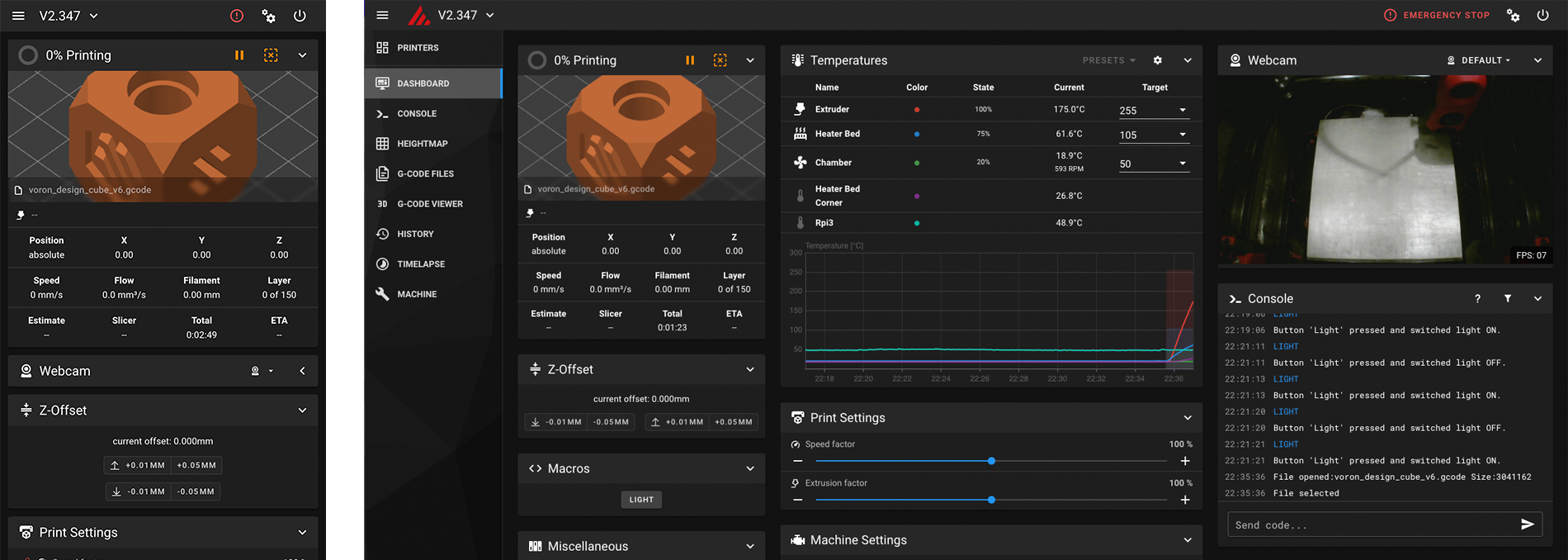
|
||||
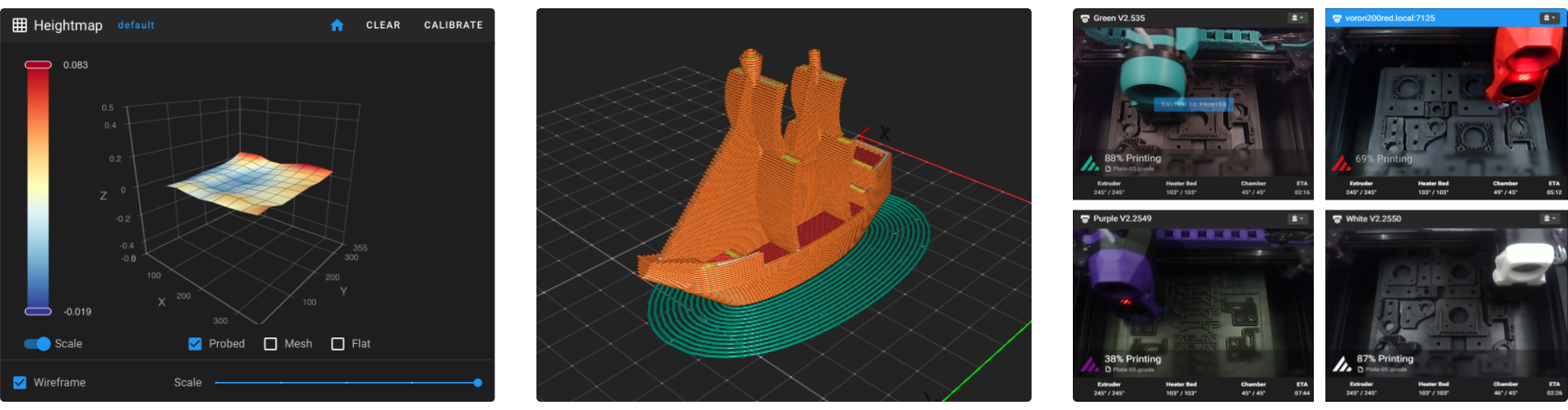
|
||||
|
||||
## Features
|
||||
|
||||
- **Responsive Web Interface:** _Optimized for desktops, tablets and mobile devices_
|
||||
- **Printer Farm:** _Supports multiple 3D printers_
|
||||
- **[Localization](https://docs.mainsail.xyz/features/localization):** _Choose between 12 different languages_
|
||||
- **File Manager:** _Delete, rename and upload your G-Code and config files_
|
||||
- **File Editor:** _Edit G-Code and config files with syntax highlighting in your browser_
|
||||
- **[Print History](https://docs.mainsail.xyz/features/history):** _See your previous prints and their status_
|
||||
- **[Statistics](https://docs.mainsail.xyz/features/history):** _View how much time your printer has been in use and the number of jobs that have succeeded or failed_
|
||||
- **Job Queue:** _Queue multiple jobs and add them directly from your slicer_
|
||||
- **[Temperature Presets](https://docs.mainsail.xyz/features/presets):** _Manage different temperature presets for easy preheating_
|
||||
- **[Bed Mesh Visualisation](https://docs.mainsail.xyz/features/bedmesh):** _View your bed using a 3D mesh graph_
|
||||
- **G-Code Viewer:** _View a 3D render of your print and follow the progress_
|
||||
- **Multi-Webcam Support:** _View your print from different angles with multiple webcams_
|
||||
- **Timelapse Integration:** _Automatically record a timelapse of your print using [moonraker-timelapse](https://github.com/mainsail-crew/moonraker-timelapse)_
|
||||
- **Power Control:** _Control power devices such as relays, TP-Link and Tasmota devices, and more_
|
||||
- **Powerful Macro-Management:** _Manage your macros on a micro level_
|
||||
- **[Configurable Dashboard](https://docs.mainsail.xyz/features/dashboard-organisation):** _Create your own personal dashboard_
|
||||
- **[Theming Support](https://docs.mainsail.xyz/features/theming):** _Customizable user interface including logos, backgrounds, and custom CSS_
|
||||
- **[Additional Sensors](https://docs.mainsail.xyz/quicktips/additional-sensors):** _Add extra sensors to the temperature graph_
|
||||
- **Exclude Objects:** _Exclude parts of your print <sup>(not officially supported by Klipper yet)</sup>_
|
||||
|
||||
## Help and Support
|
||||
|
||||
Do you need help or just want to talk? Join our active community on [Discord](https://discord.gg/skWTwTD)!
|
||||
|
||||
Did you find a bug or did you thought of a feature?
|
||||
Please create an [Issue](https://github.com/mainsail-crew/mainsail/issues) in GitHub and let us know.
|
||||
|
||||
## Official Sponsors
|
||||
|
||||
<p align='center'>
|
||||
<img src="https://raw.githubusercontent.com/mainsail-crew/docs/master/assets/img/logo-bigtreetech.png" alt='Mainsail logo' width="150">
|
||||
</p>
|
||||
|
||||
**BIGTREETECH** is the official mainboard partner of Mainsail. BIGTREETECH is committed to developing innovative and competitive products to better serve the 3D printing community.
|
||||
|
||||
## Support Mainsail
|
||||
|
||||
Mainsail is primarily developed and maintained by meteyou. To keep the project going he invests his free time, almost
|
||||
every day. To motivate him (☕🍺😜) there are several ways to support him:
|
||||
|
||||
[](https://www.patreon.com/meteyou)
|
||||
[](https://ko-fi.com/mainsail)
|
||||
|
||||
## Contributing
|
||||
|
||||
Contributions to Mainsail are always welcome!
|
||||
|
||||
- 📥 Pull requests and 🌟 Stars are always welcome.
|
||||
- Read our [contributing guidelines](CONTRIBUTING.md) to get started,
|
||||
or find us on [Discord](https://discord.gg/mainsail), we will take the time to guide you.
|
||||
|
||||
Looking for a first issue to tackle?
|
||||
|
||||
- We tag issues with [](https://github.com/mainsail-crew/mainsail/issues?q=is%3Aopen+is%3Aissue+label%3A%22good+first+issue%22) when we think they are well suited for people who are new to the codebase or OSS in general.
|
||||
- [Talk to us](https://discord.gg/mainsail), we'll find something that suits your skills and learning interest.
|
||||
For support join our discord server -> [https://discord.gg/skWTwTD](https://discord.gg/skWTwTD)
|
||||
|
||||
## Credit, sources and inspiration
|
||||
* [Kevin O'Connor](https://github.com/KevinOConnor) for the awesome 3D printer firmware [Klipper](https://github.com/KevinOConnor/klipper)
|
||||
* [Eric Callahan (arksine)](https://github.com/Arksine) for [Moonraker (Klipper API)](https://github.com/Arksine/moonraker). Without Moonraker, Mainsail would not be possible.
|
||||
* [lixxbox](https://github.com/lixxbox) for the Mainsail logo & Docs
|
||||
* [Vue.js](https://vuejs.org/): The Progressive JavaScript Framework
|
||||
* [Vuetify](https://vuetifyjs.com/): Material Design Component Framework for Vue.js
|
||||
|
||||
- [Kevin O'Connor](https://github.com/KevinOConnor) for the awesome 3D printer firmware [Klipper](https://github.com/KevinOConnor/klipper)
|
||||
- [Eric Callahan (arksine)](https://github.com/Arksine) for [Moonraker (Klipper API)](https://github.com/Arksine/moonraker). Without Moonraker, Mainsail would not be possible.
|
||||
- [lixxbox](https://github.com/lixxbox) for the Mainsail logo & Docs
|
||||
- [Vue.js](https://vuejs.org/): The Progressive JavaScript Framework
|
||||
- [Vuetify](https://vuetifyjs.com/): Material Design Component Framework for Vue.js
|
||||
|
||||
Massive thanks to the whole [Voron Design](http://vorondesign.com/) community. Without them such a project would not be
|
||||
possible.
|
||||
|
||||
[Full Credits & License information](https://docs.mainsail.xyz/credits)
|
||||
Massive thanks to the whole [Voron Design](http://vorondesign.com/) community. Without them such a project would not be possible.
|
||||
@@ -0,0 +1,5 @@
|
||||
module.exports = {
|
||||
presets: [
|
||||
'@vue/cli-plugin-babel/preset'
|
||||
]
|
||||
}
|
||||
@@ -1,82 +0,0 @@
|
||||
# configuration file for git-cliff (0.1.0)
|
||||
|
||||
[changelog]
|
||||
# changelog header
|
||||
header = """
|
||||
# What's Changed
|
||||
"""
|
||||
# template for the changelog body
|
||||
# https://tera.netlify.app/docs/#introduction
|
||||
body = """
|
||||
{% for group, commits in commits | group_by(attribute="group") %}\
|
||||
### {{ group | striptags | trim | upper_first }}
|
||||
{% for commit in commits
|
||||
| filter(attribute="scope")
|
||||
| sort(attribute="scope") %}
|
||||
- **{{commit.scope}}**: {{ commit.message | upper_first | trim }}\
|
||||
{%- if commit.breaking %}
|
||||
{% raw %} {% endraw %}- **BREAKING**: {{commit.breaking_description}}
|
||||
{%- endif -%}
|
||||
|
||||
{%- endfor -%}
|
||||
{%- for commit in commits %}
|
||||
{%- if commit.scope -%}
|
||||
{% else -%}
|
||||
{% raw %}\n{% endraw %}\
|
||||
- {{ commit.message | upper_first | trim }}\
|
||||
{%- if commit.breaking %}
|
||||
{% raw %} {% endraw %}- **BREAKING**: {{commit.breaking_description}}
|
||||
{%- endif -%}
|
||||
|
||||
{% endif -%}
|
||||
{% endfor -%}
|
||||
{% raw %}\n{% endraw %}
|
||||
{% endfor %}\n\
|
||||
"""
|
||||
# remove the leading and trailing whitespaces from the template
|
||||
trim = true
|
||||
# changelog footer
|
||||
footer = """
|
||||
"""
|
||||
|
||||
# postprocessors
|
||||
postprocessors = [
|
||||
{ pattern = '<REPO>', replace = "https://github.com/mainsail-crew/mainsail" }, # replace repository URL
|
||||
]
|
||||
|
||||
|
||||
[git]
|
||||
# allow only conventional commits
|
||||
# https://www.conventionalcommits.org
|
||||
conventional_commits = true
|
||||
filter_unconventional = true
|
||||
# regex for parsing and grouping commits
|
||||
commit_parsers = [
|
||||
|
||||
# Commits to skip
|
||||
{ message = "^docs\\(changelog\\):", group = "Changelog", skip = true}, # Old redundant commits
|
||||
{ message = "^chore: push version number to", group = "9$Other", skip = true}, # Old redundant commits
|
||||
{ message = "^chore\\(changelog\\): update changelog", group = "Changelog", skip = true}, # Old redundant commits
|
||||
|
||||
# Commits to parse
|
||||
{ message = "^feat(\\(.*\\))?:", group = "<!-- 1 -->Features"},
|
||||
{ message = "^feature(\\(.*\\))?:", group = "<!-- 1 -->Features"},
|
||||
{ message = "^fix(\\(.*\\))?:", group = "<!-- 2 -->Bug Fixes and Improvements"},
|
||||
{ message = "^perf(\\(.*\\))?:", group = "<!-- 3 -->Performance"},
|
||||
{ message = "^refactor(\\(.*\\))?:", group = "<!-- 4 -->Refactor"},
|
||||
{ message = "^style(\\(.*\\))?:", group = "<!-- 5 -->Styling"},
|
||||
{ message = "^locale(\\(.*\\))?:", group = "<!-- 6 -->Localization"},
|
||||
{ message = "^docs(\\(.*\\))?:", group = "<!-- 7 -->Documentation"},
|
||||
{ message = "^test(\\(.*\\))?:", group = "<!-- 8 -->Other"},
|
||||
{ message = "^chore(\\(.*\\))?:", group = "<!-- 8 -->Other"},
|
||||
|
||||
{ body = ".*security", group = "Security"},
|
||||
]
|
||||
commit_preprocessors = [
|
||||
{ pattern = '\((\w+\s)?#([0-9]+)\)', replace = "([#${2}](<REPO>/pull/${2}))" },
|
||||
]
|
||||
# filter out the commits that are not matched by commit parsers
|
||||
filter_commits = true
|
||||
ignore_tags="v*-(beta|rc)*"
|
||||
# glob pattern for matching git tags
|
||||
tag_pattern = "v[0-9]*"
|
||||
@@ -1,89 +0,0 @@
|
||||
# configuration file for git-cliff (0.1.0)
|
||||
|
||||
[changelog]
|
||||
# changelog header
|
||||
header = """
|
||||
<!-- THIS FILE IS UPDATED AUTOMATICALLY, ANY CHANGES WILL BE OVERRIDDEN -->
|
||||
# Changelog
|
||||
All notable changes to Mainsail will be documented in this file.\n
|
||||
"""
|
||||
# template for the changelog body
|
||||
# https://tera.netlify.app/docs/#introduction
|
||||
body = """
|
||||
{% if version %}\
|
||||
## [{{ version | trim_start_matches(pat="v") }}](https://github.com/mainsail-crew/mainsail/releases/tag/{{version}}) - {{ timestamp | date(format="%Y-%m-%d") }}
|
||||
\
|
||||
{% else %}\
|
||||
## [unreleased]
|
||||
{% endif %}\
|
||||
{% for group, commits in commits | group_by(attribute="group") %}\
|
||||
### {{ group | striptags | trim | upper_first }}
|
||||
{% for commit in commits
|
||||
| filter(attribute="scope")
|
||||
| sort(attribute="scope") %}
|
||||
- **{{commit.scope}}**: {{ commit.message | upper_first | trim }}\
|
||||
{%- if commit.breaking %}
|
||||
{% raw %} {% endraw %}- **BREAKING**: {{commit.breaking_description}}
|
||||
{%- endif -%}
|
||||
{%- endfor -%}
|
||||
{%- for commit in commits %}
|
||||
{%- if commit.scope -%}
|
||||
{% else -%}
|
||||
{% raw %}\n{% endraw %}\
|
||||
- {{ commit.message | upper_first | trim }}\
|
||||
{%- if commit.breaking %}
|
||||
{% raw %} {% endraw %}- **BREAKING**: {{commit.breaking_description}}
|
||||
{%- endif -%}
|
||||
{% endif -%}
|
||||
{% endfor -%}
|
||||
{% raw %}\n{% endraw %}
|
||||
{% endfor %}\n\
|
||||
"""
|
||||
# remove the leading and trailing whitespaces from the template
|
||||
trim = true
|
||||
# changelog footer
|
||||
footer = """
|
||||
"""
|
||||
|
||||
# postprocessors
|
||||
postprocessors = [
|
||||
{ pattern = '<REPO>', replace = "https://github.com/mainsail-crew/mainsail" }, # replace repository URL
|
||||
]
|
||||
|
||||
[git]
|
||||
# allow only conventional commits
|
||||
# https://www.conventionalcommits.org
|
||||
conventional_commits = true
|
||||
filter_unconventional = false
|
||||
# regex for parsing and grouping commits
|
||||
commit_parsers = [
|
||||
|
||||
# Commits to skip
|
||||
{ message = "^docs\\(changelog\\):", group = "Changelog", skip = true}, # Old redundant commits
|
||||
{ message = "^chore: push version number to", group = "9$Other", skip = true}, # Old redundant commits
|
||||
{ message = "^chore\\(changelog\\): update changelog", group = "Changelog", skip = true}, # Old redundant commits
|
||||
|
||||
# Commits to parse
|
||||
{ message = "^feat(\\(.*\\))?:", group = "<!-- 1 -->Features"},
|
||||
{ message = "^feature(\\(.*\\))?:", group = "<!-- 1 -->Features"},
|
||||
{ message = "^fix(\\(.*\\))?:", group = "<!-- 2 -->Bug Fixes and Improvements"},
|
||||
{ message = "^perf(\\(.*\\))?:", group = "<!-- 3 -->Performance"},
|
||||
{ message = "^refactor(\\(.*\\))?:", group = "<!-- 4 -->Refactor"},
|
||||
{ message = "^style(\\(.*\\))?:", group = "<!-- 5 -->Styling"},
|
||||
{ message = "^locale(\\(.*\\))?:", group = "<!-- 6 -->Localization"},
|
||||
{ message = "^docs(\\(.*\\))?:", group = "<!-- 7 -->Documentation"},
|
||||
{ message = "^test(\\(.*\\))?:", group = "<!-- 8 -->Other"},
|
||||
{ message = "^chore(\\(.*\\))?:", group = "<!-- 8 -->Other"},
|
||||
|
||||
{ message = "release v2.1.2", group = "Release"}, # workaround for v2.1.2 release
|
||||
|
||||
{ body = ".*security", group = "Security"},
|
||||
]
|
||||
commit_preprocessors = [
|
||||
{ pattern = '\((\w+\s)?#([0-9]+)\)', replace = "([#${2}](<REPO>/pull/${2}))" },
|
||||
]
|
||||
# filter out the commits that are not matched by commit parsers
|
||||
filter_commits = true
|
||||
ignore_tags="v*-(beta|rc)*"
|
||||
# glob pattern for matching git tags
|
||||
tag_pattern = "v[0-9]*"
|
||||
@@ -1,13 +0,0 @@
|
||||
import { defineConfig } from 'cypress'
|
||||
|
||||
export default defineConfig({
|
||||
e2e: {
|
||||
// We've imported your old cypress plugins here.
|
||||
// You may want to clean this up later by importing these.
|
||||
setupNodeEvents(on, config) {
|
||||
// @ts-ignore
|
||||
return require('./cypress/plugins/index.js')(on, config)
|
||||
},
|
||||
baseUrl: 'http://localhost:4173',
|
||||
},
|
||||
})
|
||||
@@ -1,7 +0,0 @@
|
||||
describe('Dashboard', () => {
|
||||
it('opens the page correctly', function () {
|
||||
cy.visit('/')
|
||||
cy.wait(2000)
|
||||
cy.contains('Connecting to localhost')
|
||||
})
|
||||
})
|
||||
@@ -1,5 +0,0 @@
|
||||
{
|
||||
"name": "Using fixtures to represent data",
|
||||
"email": "hello@cypress.io",
|
||||
"body": "Fixtures are a great way to mock data for responses to routes"
|
||||
}
|
||||
@@ -1,22 +0,0 @@
|
||||
/// <reference types="cypress" />
|
||||
// ***********************************************************
|
||||
// This example plugins/index.js can be used to load plugins
|
||||
//
|
||||
// You can change the location of this file or turn off loading
|
||||
// the plugins file with the 'pluginsFile' configuration option.
|
||||
//
|
||||
// You can read more here:
|
||||
// https://on.cypress.io/plugins-guide
|
||||
// ***********************************************************
|
||||
|
||||
// This function is called when a project is opened or re-opened (e.g. due to
|
||||
// the project's config changing)
|
||||
|
||||
/**
|
||||
* @type {Cypress.PluginConfig}
|
||||
*/
|
||||
// eslint-disable-next-line no-unused-vars
|
||||
module.exports = (on, config) => {
|
||||
// `on` is used to hook into various events Cypress emits
|
||||
// `config` is the resolved Cypress config
|
||||
}
|
||||
@@ -1,25 +0,0 @@
|
||||
// ***********************************************
|
||||
// This example commands.js shows you how to
|
||||
// create various custom commands and overwrite
|
||||
// existing commands.
|
||||
//
|
||||
// For more comprehensive examples of custom
|
||||
// commands please read more here:
|
||||
// https://on.cypress.io/custom-commands
|
||||
// ***********************************************
|
||||
//
|
||||
//
|
||||
// -- This is a parent command --
|
||||
// Cypress.Commands.add('login', (email, password) => { ... })
|
||||
//
|
||||
//
|
||||
// -- This is a child command --
|
||||
// Cypress.Commands.add('drag', { prevSubject: 'element'}, (subject, options) => { ... })
|
||||
//
|
||||
//
|
||||
// -- This is a dual command --
|
||||
// Cypress.Commands.add('dismiss', { prevSubject: 'optional'}, (subject, options) => { ... })
|
||||
//
|
||||
//
|
||||
// -- This will overwrite an existing command --
|
||||
// Cypress.Commands.overwrite('visit', (originalFn, url, options) => { ... })
|
||||
@@ -1,20 +0,0 @@
|
||||
// ***********************************************************
|
||||
// This example support/index.js is processed and
|
||||
// loaded automatically before your test files.
|
||||
//
|
||||
// This is a great place to put global configuration and
|
||||
// behavior that modifies Cypress.
|
||||
//
|
||||
// You can change the location of this file or turn off
|
||||
// automatically serving support files with the
|
||||
// 'supportFile' configuration option.
|
||||
//
|
||||
// You can read more here:
|
||||
// https://on.cypress.io/configuration
|
||||
// ***********************************************************
|
||||
|
||||
// Import commands.js using ES2015 syntax:
|
||||
import './commands'
|
||||
|
||||
// Alternatively you can use CommonJS syntax:
|
||||
// require('./commands')
|
||||
@@ -0,0 +1 @@
|
||||
docs.mainsail.xyz
|
||||
@@ -0,0 +1 @@
|
||||
Welcome to the Mainsail documentation. The [index](http://meteyou.github.io/mainsail) of the docs is here.
|
||||
@@ -0,0 +1,15 @@
|
||||
title: "Mainsail"
|
||||
tagline: A web interface for Klipper
|
||||
description: Mainsail is a lightweight & responsive web interface for the Klipper 3D printer firmware. It communicates with Moonraker (Klipper-API) from Arksine.
|
||||
logo: "/assets/img/logo-mainsail.png"
|
||||
theme: just-the-docs
|
||||
remote_theme: pmarsceill/just-the-docs
|
||||
color_scheme: "mainsail"
|
||||
search_enabled: true
|
||||
|
||||
defaults:
|
||||
-
|
||||
scope:
|
||||
path: "" # an empty string here means all files in the project
|
||||
values:
|
||||
image: assets/img/rtfm.png
|
||||
@@ -0,0 +1,17 @@
|
||||
$body-background-color: darken($grey-dk-300, 3%);
|
||||
$sidebar-color: $grey-dk-300;
|
||||
$border-color: $grey-dk-200;
|
||||
|
||||
$body-text-color: $grey-lt-300;
|
||||
$body-heading-color: $grey-lt-000;
|
||||
$nav-child-link-color: $grey-dk-000;
|
||||
$search-result-preview-color: $grey-dk-000;
|
||||
|
||||
$link-color: $red-300;
|
||||
$btn-primary-color: $blue-200;
|
||||
$base-button-color: $grey-dk-250;
|
||||
|
||||
$code-background-color: $grey-dk-250;
|
||||
$search-background-color: $grey-dk-250;
|
||||
$table-background-color: $grey-dk-250;
|
||||
$feedback-color: darken($sidebar-color, 3%);
|
||||
@@ -0,0 +1 @@
|
||||
$link-color: $red-300;
|
||||
@@ -0,0 +1,10 @@
|
||||
---
|
||||
layout: default
|
||||
title: About
|
||||
nav_order: 100
|
||||
has_children: false
|
||||
permalink: /about
|
||||
---
|
||||
|
||||
# About Mainsail
|
||||
trollolol
|
||||
@@ -0,0 +1,44 @@
|
||||
---
|
||||
layout: default
|
||||
title: Samba shares
|
||||
parent: Additional Support
|
||||
nav_order: 1
|
||||
permalink: /additional/shares
|
||||
---
|
||||
|
||||
## Samba shares
|
||||
|
||||
``sudo apt-get update``
|
||||
``sudo apt-get install samba samba-common-bin``
|
||||
|
||||
> _passwort setzen - wird der schritt benötigt?_
|
||||
``sudo smbpasswd -a pi``
|
||||
|
||||
``sudo chmod -R 777 /home/pi/klipper_config``
|
||||
``sudo chmod -R 777 /home/pi/sdcard``
|
||||
|
||||
``sudo nano /etc/samba/smb.conf``
|
||||
|
||||
```ini
|
||||
[klipper_config]
|
||||
comment = klipper config
|
||||
path = /home/pi/klipper_config
|
||||
writeable = Yes
|
||||
only guest = Yes
|
||||
create mask = 0777
|
||||
directory mask = 0777
|
||||
browseable = Yes
|
||||
public = yes
|
||||
|
||||
[virtual_sdcard]
|
||||
comment = virtual sdcard
|
||||
path = /home/pi/sdcard
|
||||
writeable = yes
|
||||
only guest = yes
|
||||
create mask = 0777
|
||||
directory mask = 0777
|
||||
browseable = yes
|
||||
public = yes
|
||||
```
|
||||
|
||||
``sudo service smbd restart``
|
||||
@@ -0,0 +1,7 @@
|
||||
---
|
||||
layout: default
|
||||
title: Webcam
|
||||
parent: Additional Support
|
||||
nav_order: 1
|
||||
permalink: /additional/webcam
|
||||
---
|
||||

|
After Width: | Height: | Size: 10 KiB |

|
After Width: | Height: | Size: 7.7 KiB |

|
After Width: | Height: | Size: 4.3 KiB |

|
After Width: | Height: | Size: 32 KiB |

|
After Width: | Height: | Size: 14 KiB |

|
After Width: | Height: | Size: 8.1 KiB |

|
After Width: | Height: | Size: 9.0 KiB |

|
After Width: | Height: | Size: 45 KiB |

|
After Width: | Height: | Size: 54 KiB |

|
After Width: | Height: | Size: 28 KiB |

|
After Width: | Height: | Size: 20 KiB |

|
After Width: | Height: | Size: 30 KiB |

|
After Width: | Height: | Size: 26 KiB |

|
After Width: | Height: | Size: 180 KiB |

|
After Width: | Height: | Size: 43 KiB |

|
After Width: | Height: | Size: 6.8 KiB |

|
After Width: | Height: | Size: 6.9 KiB |

|
After Width: | Height: | Size: 12 KiB |

@@ -0,0 +1,27 @@
|
||||
<?xml version="1.0" encoding="UTF-8"?>
|
||||
<!-- Generator: Adobe Illustrator 25.0.0, SVG Export Plug-In . SVG Version: 6.00 Build 0) -->
|
||||
<svg version="1.1" xmlns="http://www.w3.org/2000/svg" xmlns:xlink="http://www.w3.org/1999/xlink" x="0px" y="0px" viewBox="0 0 599.38 523.11" style="enable-background:new 0 0 599.38 523.11;" xml:space="preserve">
|
||||
<style type="text/css">
|
||||
.st0{fill:#E30613;stroke:#009640;stroke-width:0;stroke-linecap:round;stroke-linejoin:round;}
|
||||
.st1{fill:#D41216;}
|
||||
.st2{fill:#D41216;stroke:#009640;stroke-width:0;stroke-linecap:round;stroke-linejoin:round;}
|
||||
.st3{fill:none;stroke:#009640;stroke-width:0;stroke-linecap:round;stroke-linejoin:round;}
|
||||
.st4{display:none;}
|
||||
.st5{display:inline;fill:#E73D26;}
|
||||
.st6{display:inline;fill:none;}
|
||||
</style>
|
||||
<g id="Ebene_2">
|
||||
<g>
|
||||
<path class="st0" d="M382.29,142.98"/>
|
||||
<path class="st1" d="M382.29,142.98L132.98,522.82L0,522.68L344.3,0l0,0C352.18,49.06,365.2,97.68,382.29,142.98"/>
|
||||
<path class="st2" d="M413.28,213.54L208.5,522.92l132.94,0.19l135.03-206.33l0,0C452.69,284.29,431.53,249.77,413.28,213.54 L413.28,213.54"/>
|
||||
<path class="st3" d="M599.38,447.69"/>
|
||||
<path class="st3" d="M518.6,369.16"/>
|
||||
<path class="st1" d="M599.38,447.69l-49.25,75.42L417,522.82l101.6-153.67l0,0C543.48,397.35,570.49,423.61,599.38,447.69 L599.38,447.69z"/>
|
||||
</g>
|
||||
</g>
|
||||
<g id="Ebene_1" class="st4">
|
||||
<path class="st5" d="M-45.42,426.29c0.34,0.34,97.62,1.14,107.04,0.94c0.94-0.07,1.75-0.74,2.29-2.08 c0.47-1.14,1.08-2.02,1.41-2.02s0.61-0.34,0.61-0.67c0-0.81,2.76-4.91,3.56-5.24c0.27-0.13,0.47-0.61,0.47-1.08 c0-0.74,0.61-1.61,3.29-4.84c0.34-0.47,0.47-1.01,0.27-1.21c-0.27-0.2-0.07-0.4,0.34-0.4c0.47,0,0.81-0.47,0.81-1.01 c0-0.47,0.47-1.21,1.08-1.55c0.61-0.34,1.08-0.87,1.08-1.21c0.07-0.54,3.09-5.58,3.9-6.32c0.2-0.2,0.94-1.41,1.61-2.69 c0.74-1.28,1.48-2.49,1.68-2.69c0.61-0.54,3.43-4.64,3.43-4.98c0-0.2,1.95-3.23,4.37-6.72s4.37-6.66,4.37-7.06 c0-0.34,0.2-0.74,0.54-0.87c0.54-0.27,3.5-4.37,3.5-4.91c0-0.2,0.34-0.74,0.74-1.21c0.34-0.47,2.22-3.23,4.17-6.19 c1.88-2.96,3.56-5.51,3.83-5.71c0.2-0.2,0.74-1.14,1.28-2.15c0.54-1.01,1.48-2.49,2.22-3.16c0.67-0.74,1.21-1.55,1.21-1.68 c0-0.61,12.98-20.17,13.65-20.64c0.34-0.2,0.47-0.61,0.34-0.81c-0.07-0.27,0.27-1.01,0.87-1.68c0.61-0.67,1.61-2.22,2.35-3.36 c0.67-1.21,1.48-2.15,1.82-2.15c0.27,0,0.4-0.27,0.13-0.61c-0.2-0.34,0.07-1.01,0.54-1.55c1.48-1.48,5.18-7.13,5.18-7.87 c0-0.4,0.34-0.74,0.67-0.74c0.4,0,0.67-0.47,0.67-1.01c0-0.54,0.34-1.01,0.67-1.01c0.4,0,0.67-0.4,0.67-0.94 c0-0.54,0.27-1.08,0.54-1.21c0.27-0.13,1.28-1.41,2.15-2.89c0.87-1.48,1.88-3.03,2.15-3.36c1.01-1.21,9.28-13.92,9.28-14.19 c0-0.34,4.24-6.45,5.18-7.46c0.4-0.47,1.01-1.48,1.21-2.22c0.2-0.74,0.67-1.34,1.01-1.34c0.27,0,0.67-0.54,0.94-1.21 c0.4-1.14,1.82-3.56,2.49-4.17c0.2-0.2,2.15-3.16,4.37-6.66c2.15-3.43,4.5-6.86,5.11-7.53c0.67-0.74,1.08-1.28,0.87-1.28 c-0.2,0,0.74-1.48,2.02-3.36c1.28-1.82,2.35-3.63,2.35-4.03c0-0.34,0.2-0.67,0.54-0.67c0.27,0,1.21-1.34,2.15-3.03 c0.94-1.68,1.88-3.03,2.15-3.03c0.34,0,0.54-0.4,0.54-0.87c0-0.54,0.61-1.48,1.34-2.15c0.74-0.67,1.34-1.61,1.34-2.15 c0-0.47,0.34-0.87,0.67-0.87c0.4,0,0.67-0.34,0.67-0.67c0-0.74,3.16-5.85,4.5-7.26c0.4-0.4,1.01-1.41,1.21-2.15 s0.67-1.34,0.94-1.34c0.34,0,0.94-0.87,1.41-2.02c0.47-1.14,1.08-2.02,1.34-2.02c0.27,0,0.87-0.87,1.34-2.02 c0.47-1.14,1.08-2.02,1.34-2.02c0.27,0,0.87-0.94,1.34-2.02c0.47-1.14,1.14-2.02,1.48-2.02s0.4-0.34,0.2-0.67 c-0.2-0.4-0.2-0.67,0.13-0.67c0.27,0,1.41-1.55,2.55-3.36c1.08-1.88,2.22-3.36,2.55-3.36c0.27,0,0.4-0.27,0.2-0.61 c-0.2-0.27,0.2-1.08,0.94-1.75c0.74-0.67,1.34-1.55,1.34-1.95c0-0.4,0.74-1.61,1.68-2.62c0.94-1.01,1.55-1.82,1.41-1.82 c-0.34,0,8.87-14.19,10.35-15.93c0.34-0.47,0.67-1.14,0.67-1.55c0-0.34,0.34-0.67,0.67-0.67c0.4,0,0.67-0.47,0.67-1.01 s0.34-1.01,0.67-1.01c0.4,0,0.67-0.34,0.67-0.67c0-0.4,1.08-2.22,2.35-4.03s2.35-3.5,2.35-3.7s0.61-1.01,1.34-1.82 c0.74-0.81,1.34-1.88,1.34-2.35s0.34-0.87,0.74-0.87c0.34,0,0.54-0.27,0.34-0.54c-0.2-0.34,0.27-0.94,0.94-1.48 c0.67-0.54,1.14-1.14,1.01-1.34c-0.2-0.27,0.27-1.01,1.01-1.68c0.74-0.67,1.34-1.48,1.34-1.75c0-0.27,2.35-4.1,5.24-8.47 c2.96-4.37,8.27-12.51,11.9-18.02c3.63-5.58,6.93-10.29,7.33-10.56c0.4-0.27,0.47-0.54,0.13-0.54c-0.34,0-0.13-0.54,0.4-1.21 c1.01-1.21,1.08-1.75,0.2-3.83c-2.89-6.93-5.04-12.77-5.04-13.51c0-0.54-0.27-0.94-0.67-0.94c-0.34,0-0.61-0.2-0.54-0.54 c0.2-0.87-1.75-6.52-2.42-6.99c-0.4-0.27-0.47-0.67-0.2-0.94s0.2-0.81-0.13-1.21c-0.47-0.67-3.97-10.62-4.37-12.71 c-0.13-0.47-0.4-1.34-0.61-2.02c-0.27-0.61-0.67-1.68-0.94-2.35c-0.2-0.61-0.47-1.61-0.61-2.15c-0.27-1.34-1.61-5.98-2.42-8.14 c-0.34-0.94-0.67-2.35-0.74-3.16c-0.07-0.81-0.27-1.48-0.47-1.48c-0.27,0-0.47-0.4-0.54-0.87c0-0.4-0.2-1.41-0.4-2.15 c-0.2-0.74-1.01-3.9-1.68-7.06c-0.74-3.16-1.34-5.78-1.41-5.92c-0.13-0.07-0.2-0.34-0.27-0.67c-0.34-1.34-1.28-5.92-1.41-6.52 c-0.07-0.4-0.2-0.81-0.27-1.01c-0.2-0.4-0.54-2.22-0.94-5.38c-0.2-1.28-0.54-2.82-0.74-3.43c-0.27-0.61-0.4-1.34-0.34-1.68 c0.07-0.34,0-0.74-0.07-0.94c-0.27-0.67-0.67-3.09-0.94-5.38c-0.13-1.28-0.34-2.35-0.4-2.35c-0.13,0-0.61-3.36-0.74-5.92 c-0.07-1.01-0.4-2.02-0.74-2.22s-0.27-0.81,0.13-1.28c1.48-1.75-0.54-1.61-2.08,0.2l0,0c-0.87,1.01-2.22,2.96-2.96,4.37 c-0.74,1.48-1.95,3.29-2.69,4.1c-0.74,0.81-1.95,2.62-2.69,4.03c-0.74,1.34-1.82,3.03-2.42,3.63c-0.54,0.61-1.61,2.22-2.35,3.5 c-1.48,2.69-1.68,2.96-3.97,5.78c-0.94,1.21-1.68,2.35-1.68,2.55c0,0.47-6.66,10.56-7.33,11.16c-0.2,0.2-1.01,1.41-1.68,2.69 c-0.74,1.28-1.48,2.49-1.68,2.69c-0.47,0.4-8.27,12.03-8.81,13.11 M294.17,171.07c-0.74,1.14-1.82,2.76-2.35,3.56 c-0.54,0.81-1.68,2.55-2.49,3.83c-1.88,2.82-2.22,3.36-5.58,8.2c-1.48,2.15-2.69,4.03-2.69,4.24s-0.34,0.67-0.74,1.14 c-0.34,0.47-4.24,6.25-8.67,12.91c-4.37,6.66-8.27,12.44-8.67,12.91c-0.4,0.47-0.74,0.94-0.74,1.14c0,0.61-4.3,6.79-4.84,6.99 c-0.27,0.13-0.54,0.67-0.54,1.21s-0.34,0.94-0.74,0.94c-0.34,0-0.54,0.27-0.34,0.61c0.27,0.34,0.2,0.74-0.07,0.87 c-0.81,0.34-4.91,6.39-4.91,7.19c0,0.34-0.54,1.01-1.14,1.34c-0.67,0.4-0.94,0.74-0.67,0.74s-0.07,0.67-0.87,1.48 c-0.74,0.81-1.34,1.88-1.34,2.35s-0.2,0.87-0.47,0.87c-0.34,0-1.41,1.55-2.55,3.43c-1.08,1.88-2.29,3.77-2.69,4.24 c-1.34,1.61-3.7,5.04-3.7,5.45c0,0.27-0.4,0.87-0.81,1.34c-1.95,2.15-2.49,2.89-2.22,3.16c0.13,0.13-0.47,1.14-1.34,2.15 c-0.94,1.08-1.68,2.15-1.68,2.42s-0.61,1.14-1.34,2.02s-1.34,1.95-1.34,2.49s-0.27,0.81-0.61,0.61c-0.34-0.2-0.81,0.34-1.01,1.28 cLine truncated
|
||||
<line class="st6" x1="108.71" y1="523.11" x2="108.7" y2="523.11"/>
|
||||
</g>
|
||||
</svg>
|
||||
|
After Width: | Height: | Size: 12 KiB |

|
After Width: | Height: | Size: 17 KiB |

|
After Width: | Height: | Size: 3.9 KiB |

|
After Width: | Height: | Size: 18 KiB |

|
After Width: | Height: | Size: 20 KiB |

|
After Width: | Height: | Size: 24 KiB |

|
After Width: | Height: | Size: 647 KiB |

|
After Width: | Height: | Size: 382 KiB |
@@ -0,0 +1,54 @@
|
||||
---
|
||||
layout: default
|
||||
title: Custom CSS
|
||||
parent: Customizing
|
||||
nav_order: 99
|
||||
permalink: /customizing/custom-css
|
||||
---
|
||||
|
||||
## Custom-CSS
|
||||
|
||||
The custom.css file allows you to customize the appearance of Mainsail
|
||||
without the need of rebuilding it. All you need to do is to place a file
|
||||
named "custom.css" into the configuration directory ".theme" and define
|
||||
your css rules in there.
|
||||
|
||||

|
||||
|
||||

|
||||
|
||||
|
||||
### How to CSS
|
||||
|
||||
You need to be familiar with the CSS (**C**ascading **S**tyle **S**heets) syntax.
|
||||
There are many resources to learn CSS online, for example:
|
||||
- https://www.w3schools.com/css/default.asp
|
||||
|
||||
#### find the Element selector (example based on Chrome Browser)
|
||||
|
||||
Use your browser's built-in developer tools to find the right selector of the element you want to add your own flair to.
|
||||
|
||||
Open the developer tools:
|
||||
|
||||
right click anywhere on the page and select "inspect" (or F12 on the keyboard)
|
||||
|
||||

|
||||
|
||||
1. Activate the "inspector"
|
||||
2. Select the desired element
|
||||
3. Find the selector
|
||||
4. Use the style editor and fiddle arround
|
||||
|
||||

|
||||
|
||||

|
||||
|
||||
When you have achieved your desired appearance copy the full "section" including selector and curly braces
|
||||
|
||||

|
||||
|
||||
Then copy it to the "custom.css" file (you can keep everything or only what you have added)
|
||||
|
||||

|
||||
|
||||
NOTE: After saving, your browser may need a uncached reload to show the change (https://en.wikipedia.org/wiki/Wikipedia:Bypass_your_cache#Bypassing_cache)
|
||||
@@ -0,0 +1,15 @@
|
||||
---
|
||||
layout: default
|
||||
title: Favicons
|
||||
parent: Customizing
|
||||
nav_order: 3
|
||||
permalink: /customizing/favicons
|
||||
---
|
||||
|
||||
## Custom favicon
|
||||
Upload the images with the name "favicon-16x16.png" and "favicon-32x32.png"
|
||||
to the .theme folder. Allowed extension is only .png. The "favicon-32x32.png"
|
||||
is required. The "favicon-16x16.png" is optional. Maybe a hard refresh is
|
||||
necessary (CTRL+SHIFT+F5 on windows or CMD+SHIFT+R on mac).
|
||||
|
||||

|
||||
@@ -0,0 +1,22 @@
|
||||
---
|
||||
layout: default
|
||||
title: Customizing
|
||||
nav_order: 6
|
||||
has_children: true
|
||||
permalink: /customizing
|
||||
---
|
||||
|
||||
# Customizing
|
||||
|
||||
Feel free to customize Mainsail to your preferences. At the moment there
|
||||
are not many possibilities, but i will expand them continuously. If some features
|
||||
are not yet listed below, please create a FR (feature request) on Github.
|
||||
|
||||
### currently supported functions
|
||||
- [change sidebar logo](sidebar.md)
|
||||
- [change sidebar background](sidebar.md)
|
||||
- [change favicon](favicon.md)
|
||||
- [upload custom.css](custom-css.md)
|
||||
|
||||
### cooming soon
|
||||
- change primary color (all blue buttons atm)
|
||||
@@ -0,0 +1,16 @@
|
||||
---
|
||||
layout: default
|
||||
title: Prepare
|
||||
parent: Customizing
|
||||
nav_order: 1
|
||||
permalink: /customizing/prepare
|
||||
---
|
||||
|
||||
## Prepare theme
|
||||
|
||||
To prepare mainsail to use themes, you only have to create the ".theme" directory. Go into
|
||||
"Settings" > "Machine" and check if you have enabled "Hidden files". Then you can create a
|
||||
directory with the name ".theme". Important is the "." on the beginning. All further customizing
|
||||
files, will be placed in this directory.
|
||||
|
||||

|
||||
@@ -0,0 +1,22 @@
|
||||
---
|
||||
layout: default
|
||||
title: Sidebar
|
||||
parent: Customizing
|
||||
nav_order: 2
|
||||
permalink: /customizing/sidebar
|
||||
---
|
||||
|
||||
## Sidebar customizing
|
||||
|
||||
### Change sidebar logo
|
||||
Upload an image with the name "sidebar-logo" to the .theme folder.
|
||||
Allowed file extensions for the image are: .svg, .jpg, .png and .gif.
|
||||
|
||||

|
||||
|
||||
### Change sidebar background image
|
||||
Upload an image with the name "sidebar-background" to the .theme folder.
|
||||
Allowed file extensions for the image are: .jpg, .png and .gif. The
|
||||
recommended image size is 300x1000px.
|
||||
|
||||

|
||||
@@ -0,0 +1,23 @@
|
||||
---
|
||||
layout: default
|
||||
title: Welcome
|
||||
nav_order: 1
|
||||
has_children: false
|
||||
---
|
||||
|
||||
# Welcome to the Mainsail docs!
|
||||
|
||||
Mainsail is a lightweight & responsive web interface for the Klipper 3D printer firmware. It communicates with Moonraker (Klipper-API) from Arksine.
|
||||
|
||||
[Setup Guide](/setup){: .btn}
|
||||
[Release Notes](https://github.com/meteyou/mainsail/releases){: .btn}{:target="_blank"}
|
||||
|
||||
For support join us on Discord, or open an issue on Github.
|
||||
|
||||
[Discord](https://discord.gg/skWTwTD){: .btn}{:target="_blank"}
|
||||
[Github](https://github.com/meteyou/mainsail){: .btn}{:target="_blank"}
|
||||
|
||||
|
||||
|
||||
## Screenshots
|
||||

|
||||
@@ -0,0 +1,89 @@
|
||||
---
|
||||
layout: default
|
||||
title: Necessary Configuration
|
||||
nav_order: 5
|
||||
has_children: false
|
||||
permalink: /necessary-configuration
|
||||
---
|
||||
|
||||
Mainsail requires a minimum configuration to function properly. It should give you a warning at startup if the required parts are not found in your configuration.
|
||||
|
||||
## Required configuration
|
||||
### virtual_sdcard
|
||||
This allows gcode file uploads.
|
||||
```yaml
|
||||
[virtual_sdcard]
|
||||
path: ~/gcode_files
|
||||
```
|
||||
|
||||
### display_status
|
||||
This is required for messages in your status panel, if you don't have a `[display]` in your configuration.
|
||||
```yaml
|
||||
[display_status]
|
||||
```
|
||||
|
||||
### pause / resume / cancel
|
||||
This enables pause / resume in mainsail.
|
||||
|
||||
```yaml
|
||||
[pause_resume]
|
||||
```
|
||||
|
||||
## Macros
|
||||
### for pause /resume / cancel functionality
|
||||
These should be modified to your own needs.
|
||||
```yaml
|
||||
[gcode_macro PAUSE]
|
||||
rename_existing: BASE_PAUSE
|
||||
default_parameter_X: 230 #edit to your park position
|
||||
default_parameter_Y: 230 #edit to your park position
|
||||
default_parameter_Z: 10 #edit to your park position
|
||||
default_parameter_E: 1 #edit to your retract length
|
||||
gcode:
|
||||
SAVE_GCODE_STATE NAME=PAUSE_state
|
||||
BASE_PAUSE
|
||||
G91
|
||||
G1 E-{E} F2100
|
||||
G1 Z{Z}
|
||||
G90
|
||||
G1 X{X} Y{Y} F6000
|
||||
```
|
||||
|
||||
```yaml
|
||||
[gcode_macro RESUME]
|
||||
rename_existing: BASE_RESUME
|
||||
default_parameter_E: 1 #edit to your retract length
|
||||
gcode:
|
||||
G91
|
||||
G1 E{E} F2100
|
||||
G90
|
||||
RESTORE_GCODE_STATE NAME=PAUSE_state MOVE=1
|
||||
BASE_RESUME
|
||||
```
|
||||
|
||||
```yaml
|
||||
[gcode_macro CANCEL_PRINT]
|
||||
rename_existing: BASE_CANCEL_PRINT
|
||||
gcode:
|
||||
TURN_OFF_HEATERS
|
||||
CLEAR_PAUSE
|
||||
SDCARD_RESET_FILE
|
||||
BASE_CANCEL_PRINT
|
||||
```
|
||||
|
||||
## Optional
|
||||
|
||||
### customize klipper default commands
|
||||
for example, if you want to adjust the `BED_MESH_CALIBRATE` command, which you can run from "heightmap > calibrate".
|
||||
```yaml
|
||||
[gcode_macro BED_MESH_CALIBRATE]
|
||||
rename_existing: BASE_BED_MESH_CALIBRATE
|
||||
gcode:
|
||||
#before the original gcode
|
||||
BED_MESH_CLEAR
|
||||
QUAD_GANTRY_LEVEL
|
||||
G1 X125 Y125 Z5 F6000
|
||||
#the original gcode
|
||||
BASE_BED_MESH_CALIBRATE
|
||||
#after the original gcode
|
||||
```
|
||||
@@ -0,0 +1,37 @@
|
||||
---
|
||||
layout: default
|
||||
title: Additional Sensors
|
||||
parent: Quicktips
|
||||
has_children: false
|
||||
permalink: /quicktips/additional-sensors
|
||||
description: >-
|
||||
Integrate additional sensors into the temperature graph. For example Raspberry Pi, MCU, BMExxx, HTU21D, LM75 and more..
|
||||
---
|
||||
|
||||
# {{ page.title }}
|
||||
{{ page.description }}
|
||||
|
||||
## Raspberry Pi temperature sensor
|
||||
|
||||
Append the following section to your printer.cfg:
|
||||
|
||||
```yaml
|
||||
[temperature_sensor raspberry_pi]
|
||||
sensor_type: rpi_temperature
|
||||
min_temp: 10
|
||||
max_temp: 100
|
||||
```
|
||||
|
||||
## ATSAM, ATAMD, and STM32 temperature sensor
|
||||
|
||||
Append the following section to your printer.cfg:
|
||||
|
||||
```yaml
|
||||
[temperature_sensor mcu_temp]
|
||||
sensor_type: temperature_mcu
|
||||
min_temp: 0
|
||||
max_temp: 100
|
||||
```
|
||||
|
||||
For more information on this topic and how to add additional sensors, please refer to [Klipper documentation](https://www.klipper3d.org/Config_Reference.html#builtin-micro-controller-temperature-sensor){:target="_blank"}.
|
||||
{: .info}
|
||||
@@ -0,0 +1,26 @@
|
||||
---
|
||||
layout: default
|
||||
title: Console Shortcuts
|
||||
parent: Quicktips
|
||||
has_children: false
|
||||
permalink: /quicktips/console-shortcuts
|
||||
description: >-
|
||||
Similar to a terminal of your OS, there are some keyboard shortcuts in Mainsail that make your everyday life easier.
|
||||
---
|
||||
|
||||
# {{ page.title }}
|
||||
{{ page.description }}
|
||||
|
||||
## Help command
|
||||
|
||||
Issue a `HELP` command to get a list of possible commands.
|
||||
|
||||
## Autocomplete
|
||||
|
||||
You can start typing a command and then complete it with the tab-key. If there are several possibilities, you will get a list of choices.
|
||||
|
||||

|
||||
|
||||
## Scroll through commands
|
||||
|
||||
Using the ↑ up / ↓ down arrow keys you can scroll through previous commands.
|
||||
@@ -0,0 +1,20 @@
|
||||
---
|
||||
layout: default
|
||||
title: Disable Octoprint LCD menu
|
||||
parent: Quicktips
|
||||
has_children: false
|
||||
permalink: /quicktips/disable-octoprint-lcd-menu
|
||||
description: >-
|
||||
Klipper is shipped with an Octoprint entry in the LCD menu. These menu points don't work with Mainsail.
|
||||
---
|
||||
|
||||
# {{ page.title }}
|
||||
{{ page.description }}
|
||||
|
||||
## Modify printer.cfg
|
||||
Just add the following entry to your printer.cfg:
|
||||
|
||||
```yaml
|
||||
[menu __main __octoprint]
|
||||
type: disabled
|
||||
```
|
||||
@@ -0,0 +1,34 @@
|
||||
---
|
||||
layout: default
|
||||
title: Hide macros, outputs or fans
|
||||
parent: Quicktips
|
||||
has_children: false
|
||||
permalink: /quicktips/hide-gcode_macros
|
||||
description: >-
|
||||
As you probably already noticed, you can show and hide the gcode macros in the interface settings, but there is more...
|
||||
---
|
||||
|
||||
# {{ page.title }}
|
||||
{{ page.description }}
|
||||
|
||||
Did you know, that you can also hide gcode macros by prefixing the name with an underscore?
|
||||
|
||||
```yaml
|
||||
[gcode_macro MY_AWESOME_GCODE]
|
||||
gcode:
|
||||
_MY_HELPER_CODE
|
||||
```
|
||||
|
||||
```yaml
|
||||
[gcode_macro _MY_HELPER_CODE]
|
||||
gcode:
|
||||
M300
|
||||
```
|
||||
|
||||
`MY_AWESOME_GCODE` appears in your interface settings, `_MY_HELPER_CODE` not.
|
||||
|
||||

|
||||
|
||||
By the way, this also works for other configuration sections like, **fans and outputs.**
|
||||
{: .info}
|
||||
|
||||
@@ -0,0 +1,11 @@
|
||||
---
|
||||
layout: default
|
||||
title: Quicktips
|
||||
nav_order: 10
|
||||
has_children: true
|
||||
permalink: /quicktips
|
||||
description: quick tips, without much explanation
|
||||
---
|
||||
|
||||
# {{ page.title }}
|
||||
{{ page.description }}
|
||||
@@ -0,0 +1,31 @@
|
||||
---
|
||||
layout: default
|
||||
title: Presets
|
||||
parent: Quicktips
|
||||
has_children: false
|
||||
permalink: /quicktips/presets
|
||||
description: >-
|
||||
Mainsail supports so-called presets. They are often used for preheat & cooldown, but also execute normal gcode.
|
||||
---
|
||||
|
||||
# {{ page.title }}
|
||||
{{ page.description }}
|
||||
|
||||
## Setup
|
||||
In Mainsails interface settings you will find a section called "Preheat Presets". There you can set your presets via "ADD PRESET" and the following dialog.
|
||||
|
||||
### Preheat
|
||||
|
||||
Enter a name \(e.g. name, color and type of filament\) and the temperatures obtained. You can disable individual heaters and even specify a custom gcode for the preheat phase.
|
||||
|
||||

|
||||
|
||||
### Further Examples
|
||||
|
||||
#### Z-Offset
|
||||
|
||||
To quickly switch between different Z-offsets \(flexplates with smooth and textured surfaces\), you can create presets and deactivate the heaters.
|
||||
|
||||
As G-Code you simply enter `SET_GCODE_OFFSET Z=0.2`, of course with your determined offset.
|
||||
|
||||

|
||||
@@ -0,0 +1,23 @@
|
||||
---
|
||||
layout: default
|
||||
title: Slicer Upload
|
||||
parent: Quicktips
|
||||
permalink: /quicktips/slicer-upload
|
||||
description: >-
|
||||
It is possible to upload G-Code from your slicer and have it start printing.
|
||||
---
|
||||
|
||||
# {{ page.title }}
|
||||
{{ page.description }}
|
||||
Moonraker has compatibility with Octoprint's legacy file upload API.
|
||||
|
||||
### PrusaSlicer/SuperSlicer (prior to v2.3.0)
|
||||
|
||||
If not already been done, switch to advanced or expert mode and set the options under `Printer Settings / General` as shown in the screenshot below.
|
||||
For "API Key" you can type anything.
|
||||
|
||||

|
||||
|
||||
### PrusaSlicer/SuperSlicer (since v2.3.0)
|
||||
A "Physical Printer" must be defined to configure the settings from above.
|
||||
More detailed instructions will follow.
|
||||
@@ -0,0 +1,35 @@
|
||||
---
|
||||
layout: default
|
||||
title: Thumbnails
|
||||
parent: Quicktips
|
||||
permalink: /quicktips/thumbnails
|
||||
description: >-
|
||||
Mainsail can display thumbnails in the file browser and as previews in the print status.
|
||||
---
|
||||
|
||||
# {{ page.title }}
|
||||
{{ page.description }}
|
||||
|
||||

|
||||
|
||||
### PrusaSlicer (since v2.3.0)
|
||||
|
||||
In "Expert" mode PrusaSlicer has an option in the "Printer Settings" tab to activate previews.
|
||||
Under `General / Firmware`, enter `32x32,400x300` as "G-code thumbnails".
|
||||
|
||||

|
||||
|
||||
### SuperSlicer (since v2.2.54.0)
|
||||
|
||||
In "Expert" mode SuperSlicer has some very convenient options in the "Printer Settings" tab to activate and customize the previews.
|
||||
|
||||

|
||||
|
||||
### PrusaSlicer/SuperSlicer
|
||||
|
||||
To enable thumbnails, click on `Help > Show Configuration Folder` and navigate to your printer profiles inside the `printer` folder.
|
||||
Open your printer profile in a text editor and find `thumbnails =` and add the resolutions `32x32,400x300`. Save the file and restart your Slicer.
|
||||
|
||||

|
||||
|
||||
From now on the gcode files contain thumbnails displayed by mainsail.
|
||||
@@ -0,0 +1,33 @@
|
||||
---
|
||||
layout: default
|
||||
title: Update Manager
|
||||
parent: Quicktips
|
||||
has_children: false
|
||||
permalink: /quicktips/update-manager
|
||||
description: >-
|
||||
Perform updates of Mainsail, Klipper, Moonraker and your system from within Mainsail.
|
||||
---
|
||||
|
||||
# {{ page.title }}
|
||||
{{ page.description }}
|
||||
|
||||
## Moonraker.conf
|
||||
|
||||
Add the following section to your printers moonraker.conf:
|
||||
|
||||
```yaml
|
||||
[update_manager]
|
||||
|
||||
[update_manager client mainsail]
|
||||
type: web
|
||||
repo: meteyou/mainsail
|
||||
path: ~/mainsail
|
||||
```
|
||||
|
||||
Once you have restarted the moonraker service, the Update Manager will appear in Mainsails machine settings.
|
||||
|
||||

|
||||
|
||||
|
||||
You can find further information on this topic by checking out the [Moonraker documentation](https://github.com/Arksine/moonraker/blob/master/docs/configuration.md#update_manager){:target="_blank"}.
|
||||
{: .info}
|
||||
@@ -0,0 +1,14 @@
|
||||
---
|
||||
layout: default
|
||||
title: Remote Mode
|
||||
nav_order: 4
|
||||
has_children: false
|
||||
permalink: /remotemode
|
||||
description: >-
|
||||
description in progress
|
||||
---
|
||||
|
||||
# {{ page.title }}
|
||||
{{ page.description }}
|
||||
|
||||
The description will follow soon.
|
||||
@@ -0,0 +1,14 @@
|
||||
---
|
||||
layout: default
|
||||
title: Setup Guides
|
||||
nav_order: 2
|
||||
has_children: true
|
||||
permalink: /setup/
|
||||
has_toc: false
|
||||
---
|
||||
# Setup Guides
|
||||
There are different ways to install Mainsail.
|
||||
|
||||
- [MainsailOS (recommend)](mainsail-os.md)
|
||||
- [Kiauh (Klipper Install And Update Helper)](kiauh.md)
|
||||
- [Manual Setup](manual-setup/index.md)
|
||||
@@ -0,0 +1,14 @@
|
||||
---
|
||||
layout: default
|
||||
title: Kiauh Guide
|
||||
parent: Setup Guides
|
||||
nav_order: 2
|
||||
has_children: false
|
||||
permalink: /setup/kiauh
|
||||
---
|
||||
# Installing Mainsail with Kiauh
|
||||
|
||||
Kiauh is a tool that helps you install or upgrade Klipper, Moonraker, Mainsail and various
|
||||
other extensions easily and comfortably.
|
||||
|
||||
For more informations and get to the guide click [here](https://github.com/th33xitus/kiauh).
|
||||
@@ -0,0 +1,27 @@
|
||||
---
|
||||
layout: default
|
||||
title: MainsailOS Guide
|
||||
parent: Setup Guides
|
||||
nav_order: 1
|
||||
has_children: false
|
||||
permalink: /setup/mainsail-os
|
||||
---
|
||||
# Installing Mainsail with MainsailOS
|
||||
|
||||
The recommended way to install Mainsail on a Raspberry Pi is to use [MainsailOS](https://github.com/raymondh2/MainsailOS),
|
||||
a pre-packaged disk image. If you are building a custom configuration, you may need to skip
|
||||
these instructions and install Mainsail [manually](manual-setup/index.md).
|
||||
|
||||
1. Download the latest mainsailOS [Release](https://github.com/raymondh2/MainsailOS/releases)
|
||||
2. Unzip the .img file from your download.
|
||||
3. Use [BalenaEtcher](https://www.balena.io/etcher/) to write the .img on to an 8GB, or larger SDcard. *THIS WILL DESTROY ALL DATA ON YOUR CARD*.
|
||||
|
||||
_note: It is a good idea to use a premium SDcard from a reputable manufacturer such as Sandisk, Kingston or Samsung. Low end cards will often fail quickly when used in this application_
|
||||
|
||||
4. If you will be using wifi, edit the file `mainsailos-wpa-supplicant.txt` with your Wifi information. If you are having trouble seeing this file on the sdcard, try removing it and re-inserting it into your card reader.
|
||||
5. Make sure that your MCU(s) is connected to your pi, If you will be using wired networking, also make sure your ethernet cable is connected.
|
||||
5. Insert the SDcard into your Pi, and power on the Pi.
|
||||
6. Find your pi on the network, and ssh into it, (Using PuTTY on Windows or the terminal on MacOS)
|
||||
* If your network supports bonjour, the pi should show up as `mainsailos.local`
|
||||
* If your network automatically assigns DNS hostnames, it may simply show up as `mainsailos`
|
||||
* Failing these two options, you may need to check your router's DHCP server, and find out what IP address as been assigned to the device.
|
||||
@@ -0,0 +1,9 @@
|
||||
---
|
||||
layout: default
|
||||
title: Manual Setup Guide
|
||||
parent: Setup Guides
|
||||
nav_order: 3
|
||||
has_children: true
|
||||
permalink: /setup/manual-setup
|
||||
---
|
||||
This is a guide to setting up Klipper, Moonraker & Mainsail on a Raspberry Pi with Raspberry Pi OS. Other SBCs and/or Linux distributions might work, but may require a customized installation script or configs.
|
||||
@@ -0,0 +1,64 @@
|
||||
---
|
||||
layout: default
|
||||
title: Klipper
|
||||
parent: Manual Setup Guide
|
||||
grand_parent: Setup Guides
|
||||
nav_order: 3
|
||||
permalink: /setup/manual-setup/klipper
|
||||
---
|
||||
|
||||
## Klipper
|
||||
### Installation
|
||||
The following commands will clone Klipper to an appropriate directory in HOME and run the setup script.
|
||||
```bash
|
||||
cd ~
|
||||
git clone https://github.com/KevinOConnor/klipper
|
||||
cd ~/klipper
|
||||
./scripts/install-octopi.sh
|
||||
```
|
||||
|
||||
### Configuration
|
||||
After Klipper is installed, you will need to change the default location of the printer.cfg and add the UDS (unix domain socket). This is defined in the file `/etc/default/klipper`
|
||||
|
||||
To edit this file type:
|
||||
```bash
|
||||
sudo nano /etc/default/klipper
|
||||
```
|
||||
|
||||
find the following line:
|
||||
```
|
||||
KLIPPY_ARGS="/home/pi/klipper/klippy/klippy.py /home/pi/printer.cfg -l /tmp/klippy.log"
|
||||
```
|
||||
and change the config location to `/home/pi/klipper_config/printer.cfg` and add `-a /tmp/klippy_uds` to define UDS.
|
||||
```
|
||||
KLIPPY_ARGS="/home/pi/klipper/klippy/klippy.py /home/pi/klipper_config/printer.cfg -l /tmp/klippy.log -a /tmp/klippy_uds"
|
||||
```
|
||||
Save the file with `CTRL+O` and close the editor with `CTRL+X`.
|
||||
|
||||
You have to create the directories for your klipper configuration and the virtual_sdcard directory:
|
||||
|
||||
```bash
|
||||
mkdir ~/klipper_config
|
||||
mkdir ~/gcode_files
|
||||
```
|
||||
|
||||
Move your printer.cfg to ~/klipper_config and check if the following entries are present in the config.
|
||||
```ini
|
||||
[virtual_sdcard]
|
||||
# for gcode upload
|
||||
path: ~/gcode_files
|
||||
|
||||
[display_status]
|
||||
# for display messages in status panel
|
||||
|
||||
[pause_resume]
|
||||
# for pause/resume functionality.
|
||||
# Mainsail needs gcode macros for `PAUSE`, `RESUME` and `CANCEL_PRINT` to make the buttons work.
|
||||
```
|
||||
> ℹ️ **These entries are very important.**
|
||||
For the full functionality of mainsail, you should also define gcode macros for `PAUSE`, `RESUME` and `CANCEL_PRINT`. You'll find further information in [this](../../necessary-cfg.md){: target="_blank"} document.
|
||||
|
||||
After your config is in place, restart klipper with `sudo service klipper restart`. Check the `/tmp/klippy.log` for errors, if Klipper starts correctly you can continue the guide.
|
||||
|
||||
---
|
||||
[< previous step](operating-system.md){: .btn } [next step >](moonraker.md){: .btn}
|
||||
@@ -0,0 +1,175 @@
|
||||
---
|
||||
layout: default
|
||||
title: Mainsail
|
||||
parent: Manual Setup Guide
|
||||
grand_parent: Setup Guides
|
||||
nav_order: 5
|
||||
permalink: /setup/manual-setup/mainsail
|
||||
---
|
||||
|
||||
|
||||
|
||||
## Mainsail
|
||||
### Install webserver & reverse proxy (nginx)
|
||||
|
||||
nginx is important to mount all components on port 80 and host the static files from Mainsail. To install nginx you only need to execute:
|
||||
|
||||
`sudo apt install nginx`
|
||||
|
||||
now we create the config files with:
|
||||
|
||||
```
|
||||
sudo touch /etc/nginx/sites-available/mainsail
|
||||
sudo touch /etc/nginx/conf.d/upstreams.conf
|
||||
sudo touch /etc/nginx/conf.d/common_vars.conf
|
||||
```
|
||||
|
||||
Each file can be filled with the following content:
|
||||
|
||||
`sudo nano /etc/nginx/conf.d/upstreams.conf`
|
||||
|
||||
```
|
||||
# /etc/nginx/conf.d/upstreams.conf
|
||||
|
||||
upstream apiserver {
|
||||
#if you need to change your api port, edit it here
|
||||
ip_hash;
|
||||
server 127.0.0.1:7125;
|
||||
}
|
||||
|
||||
upstream mjpgstreamer {
|
||||
#if you need to change your webcam port, edit it here
|
||||
ip_hash;
|
||||
server 127.0.0.1:8080;
|
||||
}
|
||||
```
|
||||
Save the file with `CTRL+O` and close the editor with `CTRL+X`.
|
||||
|
||||
|
||||
`sudo nano /etc/nginx/conf.d/common_vars.conf`
|
||||
|
||||
```
|
||||
# /etc/nginx/conf.d/common_vars.conf
|
||||
|
||||
map $http_upgrade $connection_upgrade {
|
||||
default upgrade;
|
||||
'' close;
|
||||
}
|
||||
```
|
||||
Save the file with `CTRL+O` and close the editor with `CTRL+X`.
|
||||
|
||||
`sudo nano /etc/nginx/sites-available/mainsail`
|
||||
|
||||
```
|
||||
# /etc/nginx/sites-available/mainsail
|
||||
|
||||
server {
|
||||
listen 80 default_server;
|
||||
listen [::]:80 default_server;
|
||||
|
||||
access_log /var/log/nginx/mainsail-access.log;
|
||||
error_log /var/log/nginx/mainsail-error.log;
|
||||
|
||||
#disable this section on smaller hardware like a pi zero
|
||||
gzip on;
|
||||
gzip_vary on;
|
||||
gzip_proxied any;
|
||||
gzip_proxied expired no-cache no-store private auth;
|
||||
gzip_comp_level 4;
|
||||
gzip_buffers 16 8k;
|
||||
gzip_http_version 1.1;
|
||||
gzip_types text/plain text/css text/xml text/javascript application/x-javascript application/json application/xml;
|
||||
|
||||
#web_path from mainsail static files
|
||||
root /home/pi/mainsail;
|
||||
|
||||
index index.html;
|
||||
server_name _;
|
||||
|
||||
#disable max upload size
|
||||
client_max_body_size 0;
|
||||
|
||||
location / {
|
||||
try_files $uri $uri/ /index.html;
|
||||
}
|
||||
|
||||
location = /index.html {
|
||||
add_header Cache-Control "no-store, no-cache, must-revalidate";
|
||||
}
|
||||
|
||||
location /websocket {
|
||||
proxy_pass http://apiserver/websocket;
|
||||
proxy_http_version 1.1;
|
||||
proxy_set_header Upgrade $http_upgrade;
|
||||
proxy_set_header Connection $connection_upgrade;
|
||||
proxy_set_header Host $http_host;
|
||||
proxy_set_header X-Real-IP $remote_addr;
|
||||
proxy_set_header X-Forwarded-For $proxy_add_x_forwarded_for;
|
||||
proxy_read_timeout 86400;
|
||||
}
|
||||
|
||||
location ~ ^/(printer|api|access|machine|server)/ {
|
||||
proxy_pass http://apiserver$request_uri;
|
||||
proxy_set_header Host $http_host;
|
||||
proxy_set_header X-Real-IP $remote_addr;
|
||||
proxy_set_header X-Forwarded-For $proxy_add_x_forwarded_for;
|
||||
proxy_set_header X-Scheme $scheme;
|
||||
}
|
||||
|
||||
location /webcam/ {
|
||||
proxy_pass http://mjpgstreamer/;
|
||||
}
|
||||
}
|
||||
```
|
||||
Save the file with `CTRL+O` and close the editor with `CTRL+X`.
|
||||
|
||||
Create directory for static files and active nginx config:
|
||||
|
||||
```
|
||||
mkdir ~/mainsail
|
||||
sudo rm /etc/nginx/sites-enabled/default
|
||||
sudo ln -s /etc/nginx/sites-available/mainsail /etc/nginx/sites-enabled/
|
||||
sudo service nginx restart
|
||||
```
|
||||
|
||||
Now you can check again the API if it works with the reverse proxy. Open the url http://\<printer-ip\>/printer/info in your browser. if you see a content like this:
|
||||
|
||||
```
|
||||
{"result": {"hostname": "voron250", "error_detected": false, "version": "v0.8.0-479-gd586fb06", "is_ready": true, "message": "Printer is ready", "cpu": "4 core ARMv7 Processor rev 4 (v7l)"}}
|
||||
```
|
||||
|
||||
Now we can install Mainsail (static httpdocs).
|
||||
|
||||
### Install httpdocs
|
||||
|
||||
Now you can download the current mainsail static data
|
||||
|
||||
```
|
||||
cd ~/mainsail
|
||||
wget -q -O mainsail.zip https://github.com/meteyou/mainsail/releases/latest/download/mainsail.zip && unzip mainsail.zip && rm mainsail.zip
|
||||
```
|
||||
|
||||
Now it should be possible to open the interface: `http://<printer-ip>/`.
|
||||
|
||||
### Important macros
|
||||
|
||||
if you want to get the full experience with mainsail and klipper virtual_sdcard print, you should use these macros, or use them as templates for your own.
|
||||
|
||||
[Macro Link](../../necessary-cfg.md){: .btn target="_blank"}
|
||||
|
||||
|
||||
### Change the Hostname (optional)
|
||||
|
||||
to use the hostname instate of the ip, you can install the avahi-daemon:
|
||||
|
||||
`sudo apt install avahi-daemon`
|
||||
|
||||
and you can config your hostname:
|
||||
|
||||
`sudo raspi-config`
|
||||
|
||||
in 2 Network Options > N1 Hostname you can edit your hostname of your raspberry pi. After a reboot you can use http://\<hostname\>.local/ to open the webinterface.
|
||||
|
||||
|
||||
---
|
||||
[< previous step](moonraker.md){: .btn }
|
||||
@@ -0,0 +1,86 @@
|
||||
---
|
||||
layout: default
|
||||
title: Moonraker
|
||||
parent: Manual Setup Guide
|
||||
grand_parent: Setup Guides
|
||||
nav_order: 4
|
||||
permalink: /setup/manual-setup/moonraker
|
||||
---
|
||||
## Moonraker
|
||||
Moonraker is a web server that exposes APIs which lets Mainsail interact with Klipper.
|
||||
|
||||
### Installation
|
||||
Clone Moonraker into your HOME directory:
|
||||
```bash
|
||||
cd ~
|
||||
git clone https://github.com/Arksine/moonraker.git
|
||||
```
|
||||
|
||||
Run Moonrakers install script:
|
||||
```bash
|
||||
cd ~/moonraker/scripts
|
||||
./install-moonraker.sh -c /home/pi/klipper_config/moonraker.conf
|
||||
```
|
||||
|
||||
### Configuration
|
||||
> ⚠️ **Please pay attention to the following steps!**
|
||||
Misconfigured trusted_clients are a very common source of failure.
|
||||
|
||||
For Moonraker you'll need to create a separate config file.
|
||||
|
||||
`nano ~/klipper_config/moonraker.conf`
|
||||
|
||||
Insert the following part and modify `trusted_clients` according to arksines description below.
|
||||
Also consider further IP ranges, e.g. when connecting via VPN. To determine your local ip `ip a` and `ifconfig -a` are common ways to do so on Linux and `ipconfig` on Windows.
|
||||
|
||||
> ℹ️ **This is a very basic config**
|
||||
For more options and detailed explanations you should follow [arksines instructions](https://github.com/Arksine/moonraker/blob/master/docs/installation.md).
|
||||
|
||||
```
|
||||
[server]
|
||||
host: 0.0.0.0
|
||||
config_path: ~/klipper_config
|
||||
|
||||
[authorization]
|
||||
enabled: true
|
||||
trusted_clients:
|
||||
192.168.1.0/24
|
||||
2a02:810d:9340:33f6::/64
|
||||
|
||||
[update_manager]
|
||||
|
||||
[update_manager client mainsail]
|
||||
type: web
|
||||
repo: meteyou/mainsail
|
||||
path: ~/mainsail
|
||||
```
|
||||
|
||||
> 🔥 **trusted_clients - read carefully** 🔥
|
||||
A list of newline separated ip addresses and/or ip ranges that are
|
||||
trusted. Trusted clients are given full access to the API. Both IPv4
|
||||
and IPv6 addresses and ranges are supported. Ranges must be expressed
|
||||
in CIDR notation (see http://ip.sb/cidr for more info).
|
||||
For example, an entry of 192.168.1.0/24 will authorize IPs in the range of 192.168.1.1 -
|
||||
192.168.1.254. Note that when specifying IPv4 ranges the last segment
|
||||
of the ip address must be 0. The default is no clients or ranges are
|
||||
trusted.
|
||||
|
||||
Save the file with `CTRL+O` and close the editor with `CTRL+X`.
|
||||
|
||||
Restart Moonraker
|
||||
```bash
|
||||
sudo service moonraker restart
|
||||
```
|
||||
|
||||
Open the following url with your printers IP in your browser
|
||||
```
|
||||
http://<printer-ip>:7125/printer/info
|
||||
```
|
||||
|
||||
If everything has been set up successfully, a message like this should appear:
|
||||
```
|
||||
{"result": {"hostname": "voron250", "error_detected": false, "version": "v0.8.0-643-g528f9f25", "is_ready": true, "message": "Printer is ready", "cpu": "4 core ARMv7 Processor rev 4 (v7l)"}}
|
||||
```
|
||||
|
||||
---
|
||||
[< previous step](klipper.md){: .btn } [next step >](mainsail.md){: .btn }
|
||||