
 Christian WürthnerandGina Häußge
58086a2928
* Create new WebcamPlugin type

* Let user switch webcam plugin

* Move keyboard controls

* Rename webcam plugin

* Rename webcam plugin

* Update settings pane

* Extract JS code from control.js

* Temporary fix for KO bindings

* Migrate settings to plugin

* Fix issue on tab change

* Migrate settings UI

* Join WebRTC servers to string on migration

* Allow list of all webcams to be retrieved

* Enricht settings with webcams and ensure backwards compatibility

* Fix binfing lost bug

* Do not contain webcam settings if permission is missing

* Style tabs

* Unload webcam based on visibility

* Let user pick default webcam

* Refactor webcam access in Python

* Show snapshot and stream URL in settings dialog

* Update timelapse

* Small UI improvements

* Ensure default webcam is used if nothign is set

* Remove dummy webcams

* Remove commented sections

* Fix CI build

* Ensure configuration types are correct

* Only show selector if more than one webcam is available

* Access default webcam savely in case not set

* Use enum values for stream ratio

* Address PR comments

* Convert data structure to dict

* Create function to get snapshot, remove force=True from migration

* Fix timelapse not captured

* Fix inverted condition check

* Update wording in timelapse error message

* Apply rotate/flip to timelapse

* Add compatibility layer for plugins

* Remove exclusion of classicwebcam plugin

* Fix unit tests

* Fix unit tests #2

* Add onWebcamVisbilityChange callback

* Move stream and snapshot wizard to plugin

* Replace classic_webcam with classicwebcam

* Rename WebcamPlugin to WebcamProviderPlugin

* Rename take_snapshot to take_webcam_snapshot

* Update copyright

* Default to empty dict

* Wrap WebcamCompatibility into Optional

* Rename CoreWizardWebcamViewModel to ClassicWebcamWizardViewModel

* Simplify settings dict creation

* Use plugin identifier for logging

* Add file header

* Simplify toDict() function and renamt to to_dict()

* Rename iter to snapshot

* Remove redundant boolean checks

* Replace  with

* Add WebcamNotAbleToTakeSnapshotException

* Reset wizard version to 1

* Reset wizard version to 1

* Update disabling discouraged messgae

* Update default webcam description

* Simplify webcam collection

* Remove test webcam

* 🐛 Fix wrong data location

* ♻️ Refactor settings compatibility layer

Use a settings overlay centrally derived on
server start/platform initialization. Mark overlay
as deprecated so that warnings on read and write
access will be logged to overlay leaves, and writes
will also be denied.

Adjust octoprint.webcams methods to allow injecting
plugin manager and settings instance to use to
support use during initialization.

TODO: Reset overlay when default webcam changes?

TODO: If we split the compat layer then we should
also add TWO overlays, one for snapshot and one for
stream config stuff.

* 💚 Fix unit tests

* ♻️ Move webcam related schema

Webcam, WebcamCompatibility and RatioEnum have
nothing to do with the config anymore but are
rather WebcamProviderPlugin specific, so let's move
them into their own octoprint.schema.webcam package.

* Remove old wizard logic

* Add seprate setting got snapshot webcam

* Convert WebRTC servers to list

* 🚸 Log warning on deprecated settings on API

If anyone is trying to set stuff from the webcam
compat layer, we now get a log entry, or multiple
if needed.

Long term we might want to return an error on
the API

* ☂ Ensure plugin can actually be found

Also use API methods of plugin manager instead of
accessing internal control properties directly.

Co-authored-by: Gina Häußge <gina@octoprint.org>

OctoPrint










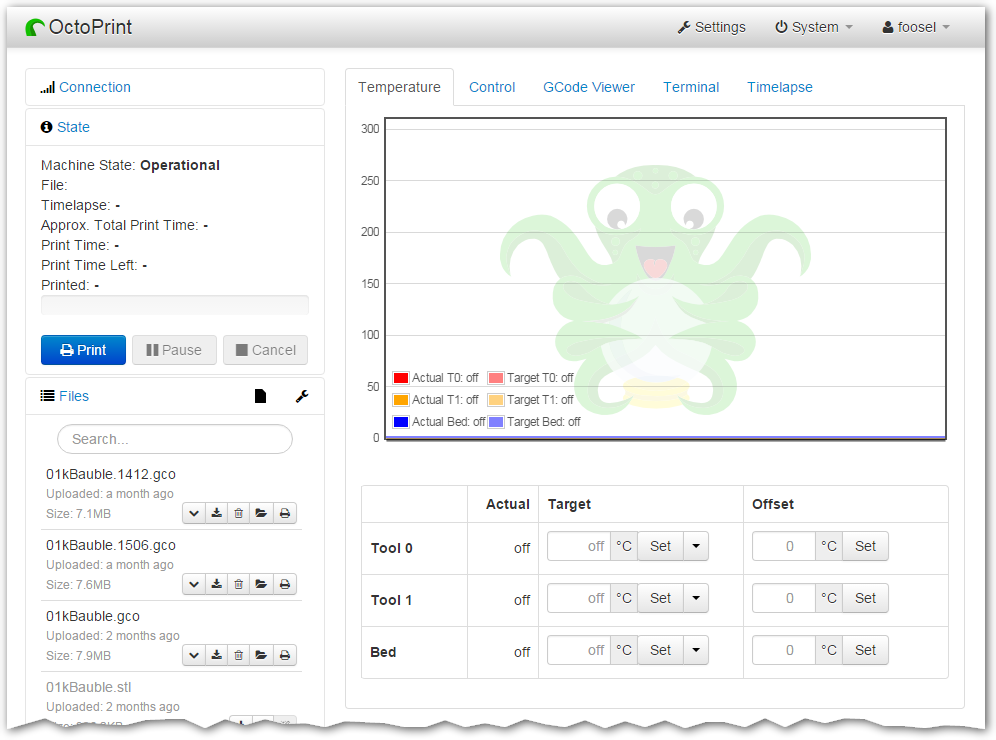
OctoPrint provides a snappy web interface for controlling consumer 3D printers. It is Free Software and released under the GNU Affero General Public License V3.
Its website can be found at octoprint.org.
The community forum is available at community.octoprint.org. It also serves as central knowledge base.
An invite to the Discord server can be found at discord.octoprint.org.
The FAQ can be accessed by following faq.octoprint.org.
The documentation is located at docs.octoprint.org.
The official plugin repository can be reached at plugins.octoprint.org.
OctoPrint's development wouldn't be possible without the financial support by its community. If you enjoy OctoPrint, please consider becoming a regular supporter!
You are currently looking at the source code repository of OctoPrint. If you already installed it (e.g. by using the Raspberry Pi targeted distribution OctoPi) and only want to find out how to use it, the documentation might be of more interest for you. You might also want to subscribe to join the community forum at community.octoprint.org where there are other active users who might be able to help you with any questions you might have.
Contributing
Contributions of all kinds are welcome, not only in the form of code but also with regards to the official documentation, debugging help in the bug tracker, support of other users on the community forum at community.octoprint.org or the official discord at discord.octoprint.org and also financially.
If you think something is bad about OctoPrint or its documentation the way it is, please help in any way to make it better instead of just complaining about it -- this is an Open Source Project after all :)
For information about how to go about submitting bug reports or pull requests, please see the project's Contribution Guidelines.
Installation
Installation instructions for installing from source for different operating systems can be found on the forum.
If you want to run OctoPrint on a Raspberry Pi, you really should take a look at OctoPi which is a custom SD card image that includes OctoPrint plus dependencies.
The generic steps that should basically be done regardless of operating system
and runtime environment are the following (as regular
user, please keep your hands off of the sudo command here!) - this assumes
you already have Python 3.7+, pip and virtualenv and their dependencies set up on your system:
- Create a user-owned virtual environment therein:
virtualenv venv. If you want to specify a specific python to use instead of whatever version your system defaults to, you can also explicitly require that via the--pythonparameter, e.g.virtualenv --python=python3 venv. - Install OctoPrint into that virtual environment:
./venv/bin/pip install OctoPrint
You may then start the OctoPrint server via /path/to/OctoPrint/venv/bin/octoprint, see Usage
for details.
After installation, please make sure you follow the first-run wizard and set up access control as necessary.
Dependencies
OctoPrint depends on a few python modules to do its job. Those are automatically installed when installing
OctoPrint via pip.
OctoPrint currently supports Python 3.7, 3.8, 3.9, 3.10 and 3.11.
Usage
Running the pip install via
pip install OctoPrint
installs the octoprint script in your Python installation's scripts folder
(which, depending on whether you installed OctoPrint globally or into a virtual env, will be in your PATH or not). The
following usage examples assume that the octoprint script is on your PATH.
You can start the server via
octoprint serve
By default it binds to all interfaces on port 5000 (so pointing your browser to http://127.0.0.1:5000
will do the trick). If you want to change that, use the additional command line parameters host and port,
which accept the host ip to bind to and the numeric port number respectively. If for example you want the server
to only listen on the local interface on port 8080, the command line would be
octoprint serve --host=127.0.0.1 --port=8080
Alternatively, the host and port on which to bind can be defined via the config file.
If you want to run OctoPrint as a daemon (only supported on Linux), use
octoprint daemon {start|stop|restart} [--pid PIDFILE]
If you do not supply a custom pidfile location via --pid PIDFILE, it will be created at /tmp/octoprint.pid.
You can also specify the config file or the base directory (for basing off the uploads, timelapse and logs folders),
e.g.:
octoprint serve --config /path/to/another/config.yaml --basedir /path/to/my/basedir
To start OctoPrint in safe mode - which disables all third party plugins that do not come bundled with OctoPrint - use
the --safe flag:
octoprint serve --safe
See octoprint --help for more information on the available command line parameters.
OctoPrint also ships with a run script in its source directory. You can invoke it to start the server. It
takes the same command line arguments as the octoprint script.
Configuration
If not specified via the command line, the config file config.yaml for OctoPrint is expected in the settings folder,
which is located at ~/.octoprint on Linux, at %APPDATA%/OctoPrint on Windows and
at ~/Library/Application Support/OctoPrint on MacOS.
A comprehensive overview of all available configuration settings can be found in the docs. Please note that the most commonly used configuration settings can also easily be edited from OctoPrint's settings dialog.
Special Thanks
Cross-browser testing services are kindly provided by BrowserStack.
Profiling is done with the help of PyVmMonitor.
Error tracking is powered and sponsored by Sentry.