
153 lines
8.4 KiB
Markdown
153 lines
8.4 KiB
Markdown
<p align="center"><img src="https://octoprint.org/assets/img/logo.png" alt="OctoPrint's logo" /></p>
|
|
|
|
<h1 align="center">OctoPrint</h1>
|
|
|
|
<p align="center">
|
|
<img src="https://img.shields.io/github/v/release/OctoPrint/OctoPrint?logo=github&logoColor=white" alt="GitHub release"/>
|
|
<img src="https://img.shields.io/pypi/v/OctoPrint?logo=python&logoColor=white" alt="PyPI"/>
|
|
<img src="https://img.shields.io/github/actions/workflow/status/OctoPrint/OctoPrint/build.yml?branch=master" alt="Build status"/>
|
|
<a href="https://community.octoprint.org"><img src="https://img.shields.io/discourse/users?label=forum&logo=discourse&logoColor=white&server=https%3A%2F%2Fcommunity.octoprint.org" alt="Community Forum"/></a>
|
|
<a href="https://discord.octoprint.org"><img src="https://img.shields.io/discord/704958479194128507?label=discord&logo=discord&logoColor=white" alt="Discord"/></a>
|
|
<a href="https://octoprint.org/conduct/"><img src="https://img.shields.io/badge/Contributor%20Covenant-v2.0%20adopted-ff69b4.svg" alt="Contributor Covenant"/></a>
|
|
<a href="https://github.com/psf/black"><img src="https://img.shields.io/badge/code%20style-black-000000.svg" alt="Code style: black"/></a>
|
|
<a href="https://github.com/prettier/prettier"><img src="https://img.shields.io/badge/code_style-prettier-ff69b4.svg?style=flat-square" alt="Code style: prettier"/></a>
|
|
<a href="https://pycqa.github.io/isort/"><img src="https://img.shields.io/badge/%20imports-isort-%231674b1" alt="Imports: isort"/></a>
|
|
<a href="https://github.com/pre-commit/pre-commit"><img src="https://img.shields.io/badge/pre--commit-enabled-brightgreen?logo=pre-commit&logoColor=white" alt="pre-commit"/></a>
|
|
</p>
|
|
|
|
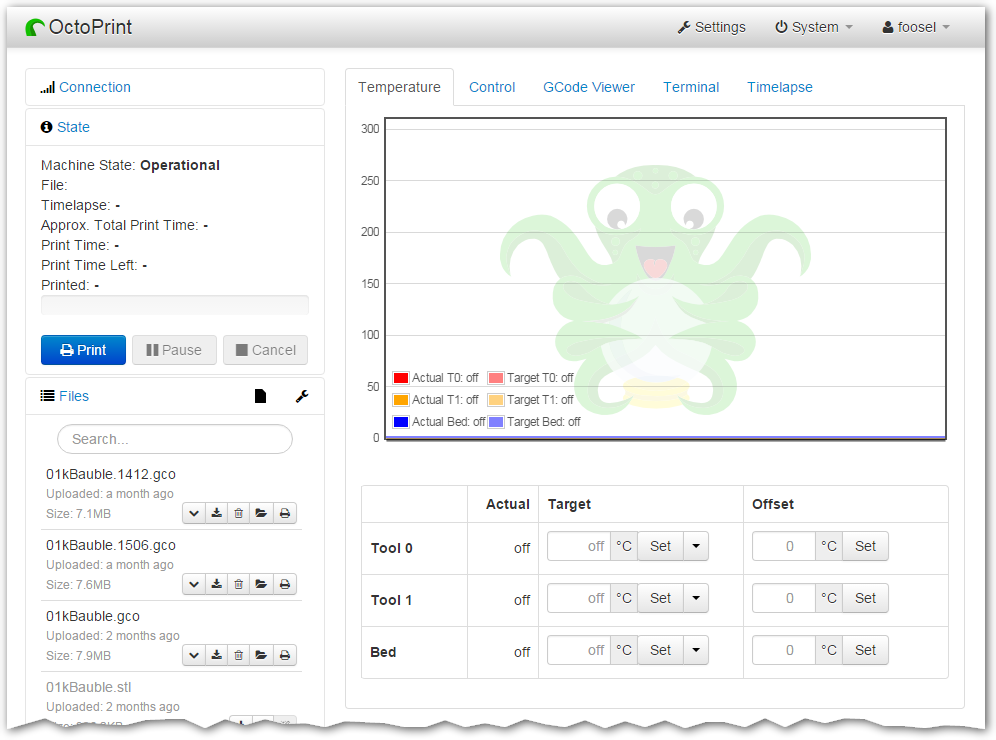
OctoPrint provides a snappy web interface for controlling consumer 3D printers. It is Free Software
|
|
and released under the [GNU Affero General Public License V3](https://www.gnu.org/licenses/agpl-3.0.html).
|
|
|
|
Its website can be found at [octoprint.org](https://octoprint.org/?utm_source=github&utm_medium=readme).
|
|
|
|
The community forum is available at [community.octoprint.org](https://community.octoprint.org/?utm_source=github&utm_medium=readme). It also serves as a central knowledge base.
|
|
|
|
An invite to the Discord server can be found at [discord.octoprint.org](https://discord.octoprint.org).
|
|
|
|
The FAQ can be accessed by following [faq.octoprint.org](https://faq.octoprint.org/?utm_source=github&utm_medium=readme).
|
|
|
|
The documentation is located at [docs.octoprint.org](https://docs.octoprint.org).
|
|
|
|
The official plugin repository can be reached at [plugins.octoprint.org](https://plugins.octoprint.org/?utm_source=github&utm_medium=readme).
|
|
|
|
**OctoPrint's development wouldn't be possible without the [financial support by its community](https://octoprint.org/support-octoprint/?utm_source=github&utm_medium=readme).
|
|
If you enjoy OctoPrint, please consider becoming a regular supporter!**
|
|
|
|
|
|
|
|
You are currently looking at the source code repository of OctoPrint. If you already installed it
|
|
(e.g. by using the Raspberry Pi targeted distribution [OctoPi](https://github.com/guysoft/OctoPi)) and only
|
|
want to find out how to use it, [the documentation](https://docs.octoprint.org/) might be of more interest for you. You might also want to subscribe to join
|
|
[the community forum at community.octoprint.org](https://community.octoprint.org) where there are other active users who might be
|
|
able to help you with any questions you might have.
|
|
|
|
## Contributing
|
|
|
|
Contributions of all kinds are welcome, not only in the form of code but also with regards to the
|
|
[official documentation](https://docs.octoprint.org/), debugging help
|
|
in the [bug tracker](https://github.com/OctoPrint/OctoPrint/issues), support of other users on
|
|
[the community forum at community.octoprint.org](https://community.octoprint.org) or
|
|
[the official discord at discord.octoprint.org](https://discord.octoprint.org)
|
|
and also [financially](https://octoprint.org/support-octoprint/?utm_source=github&utm_medium=readme).
|
|
|
|
If you think something is bad about OctoPrint or its documentation the way it is, please help
|
|
in any way to make it better instead of just complaining about it -- this is an Open Source Project
|
|
after all :)
|
|
|
|
For information about how to go about submitting bug reports or pull requests, please see the project's
|
|
[Contribution Guidelines](https://github.com/OctoPrint/OctoPrint/blob/master/CONTRIBUTING.md).
|
|
|
|
## Installation
|
|
|
|
Installation instructions for installing from source for different operating
|
|
systems can be found [on the forum](https://community.octoprint.org/tags/c/support/guides/15/setup).
|
|
|
|
If you want to run OctoPrint on a Raspberry Pi, you really should take a look at [OctoPi](https://github.com/guysoft/OctoPi)
|
|
which is a custom SD card image that includes OctoPrint plus dependencies.
|
|
|
|
The generic steps that should basically be done regardless of operating system
|
|
and runtime environment are the following (as *regular
|
|
user*, please keep your hands *off* of the `sudo` command here!) - this assumes
|
|
you already have Python 3.7+, pip and virtualenv and their dependencies set up on your system:
|
|
|
|
1. Create a user-owned virtual environment therein: `virtualenv venv`. If you want to specify a specific python
|
|
to use instead of whatever version your system defaults to, you can also explicitly require that via the `--python`
|
|
parameter, e.g. `virtualenv --python=python3 venv`.
|
|
2. Install OctoPrint *into that virtual environment*: `./venv/bin/pip install OctoPrint`
|
|
|
|
You may then start the OctoPrint server via `/path/to/OctoPrint/venv/bin/octoprint`, see [Usage](#usage)
|
|
for details.
|
|
|
|
After installation, please make sure you follow the first-run wizard and set up
|
|
access control as necessary.
|
|
|
|
## Dependencies
|
|
|
|
OctoPrint depends on a few python modules to do its job. Those are automatically installed when installing
|
|
OctoPrint via `pip`.
|
|
|
|
OctoPrint currently supports Python 3.7, 3.8, 3.9, 3.10 and 3.11.
|
|
|
|
## Usage
|
|
|
|
Running the pip install via
|
|
|
|
pip install OctoPrint
|
|
|
|
installs the `octoprint` script in your Python installation's scripts folder
|
|
(which, depending on whether you installed OctoPrint globally or into a virtual env, will be in your `PATH` or not). The
|
|
following usage examples assume that the `octoprint` script is on your `PATH`.
|
|
|
|
You can start the server via
|
|
|
|
octoprint serve
|
|
|
|
By default it binds to all interfaces on port 5000 (so pointing your browser to `http://127.0.0.1:5000`
|
|
will do the trick). If you want to change that, use the additional command line parameters `host` and `port`,
|
|
which accept the host ip to bind to and the numeric port number respectively. If for example you want the server
|
|
to only listen on the local interface on port 8080, the command line would be
|
|
|
|
octoprint serve --host=127.0.0.1 --port=8080
|
|
|
|
Alternatively, the host and port on which to bind can be defined via the config file.
|
|
|
|
If you want to run OctoPrint as a daemon (only supported on Linux), use
|
|
|
|
octoprint daemon {start|stop|restart} [--pid PIDFILE]
|
|
|
|
If you do not supply a custom pidfile location via `--pid PIDFILE`, it will be created at `/tmp/octoprint.pid`.
|
|
|
|
You can also specify the config file or the base directory (for basing off the `uploads`, `timelapse` and `logs` folders),
|
|
e.g.:
|
|
|
|
octoprint serve --config /path/to/another/config.yaml --basedir /path/to/my/basedir
|
|
|
|
To start OctoPrint in safe mode - which disables all third party plugins that do not come bundled with OctoPrint - use
|
|
the ``--safe`` flag:
|
|
|
|
octoprint serve --safe
|
|
|
|
See `octoprint --help` for more information on the available command line parameters.
|
|
|
|
OctoPrint also ships with a `run` script in its source directory. You can invoke it to start the server. It
|
|
takes the same command line arguments as the `octoprint` script.
|
|
|
|
## Configuration
|
|
|
|
If not specified via the command line, the config file `config.yaml` for OctoPrint is expected in the settings folder,
|
|
which is located at `~/.octoprint` on Linux, at `%APPDATA%/OctoPrint` on Windows and
|
|
at `~/Library/Application Support/OctoPrint` on MacOS.
|
|
|
|
A comprehensive overview of all available configuration settings can be found
|
|
[in the docs](https://docs.octoprint.org/en/master/configuration/config_yaml.html).
|
|
Please note that the most commonly used configuration settings can also easily
|
|
be edited from OctoPrint's settings dialog.
|
|
|
|
## Special Thanks
|
|
|
|
Cross-browser testing services are kindly provided by [BrowserStack](https://www.browserstack.com/).
|
|
|
|
Profiling is done with the help of [PyVmMonitor](https://www.pyvmmonitor.com).
|
|
|
|
Error tracking is powered and sponsored by [Sentry](https://sentry.io).
|